<?xml version="1.0" encoding="utf-8"?><feed xmlns="http://www.w3.org/2005/Atom" ><generator uri="https://jekyllrb.com/" version="3.10.0">Jekyll</generator><link href="https://asamayam.github.io/feed.xml" rel="self" type="application/atom+xml" /><link href="https://asamayam.github.io/" rel="alternate" type="text/html" /><updated>2026-06-01T00:38:49+00:00</updated><id>https://asamayam.github.io/feed.xml</id><title type="html">Tech Bytes</title><subtitle>Hands-on architecture notes from Arun Samayam on cloud platforms, enterprise databases, governance, FinOps, and AI.</subtitle><author><name>Arun Samayam</name></author><entry><title type="html">Practical MySQL Performance Tuning</title><link href="https://asamayam.github.io/posts/practical-mysql-performance-tuning/" rel="alternate" type="text/html" title="Practical MySQL Performance Tuning" /><published>2026-04-26T00:00:00+00:00</published><updated>2026-04-26T00:00:00+00:00</updated><id>https://asamayam.github.io/posts/practical-mysql-performance-tuning</id><content type="html" xml:base="https://asamayam.github.io/posts/practical-mysql-performance-tuning/"><![CDATA[<p>Performance tuning matters because it affects the experience people feel at the application layer.</p>

<p>In OLTP systems, slow checkout flows and query latency affect revenue directly. In batch-oriented systems, the tuning goal shifts toward predictable throughput and completing work inside the available processing window. Good tuning starts with the workload, not with random parameter changes.</p>

<p>This article condenses the practical approach from the source material into one workflow:</p>

<ul>
  <li>Set realistic baseline expectations</li>
  <li>Size the server for the workload</li>
  <li>Tune the MySQL configuration for the deployment type</li>
  <li>Identify bottlenecks before changing SQL</li>
  <li>Use built-in MySQL tools to validate changes</li>
  <li>Review index design and maintenance choices</li>
</ul>

<h2 id="start-with-the-right-goal">Start with the Right Goal</h2>

<p>Do not start by tuning the loudest query you find.</p>

<p>Start by answering these questions:</p>

<ul>
  <li>What performance does the application need?</li>
  <li>Where does the workload spend time today?</li>
  <li>Which resource becomes the bottleneck first: CPU, memory, disk, or SQL design?</li>
  <li>What does good enough look like for this system?</li>
</ul>

<p>That framing matters because a query that runs slowly in isolation may not be the real problem. The real issue may come from memory pressure, I/O waits, missing indexes, or a database layout that does not match the workload.</p>

<h2 id="size-the-server-for-the-workload">Size the Server for the Workload</h2>

<p>Database performance depends on hardware resources and configuration together.</p>

<h3 id="cpu">CPU</h3>

<p>CPU throughput affects concurrency, parsing, and execution speed. This guide uses systems ranging from a handful of cores to larger deployments with many more. The right CPU choice depends on the transaction rate, query complexity, and the amount of parallel work the application generates.</p>

<h3 id="memory">Memory</h3>

<p>Memory drives cache efficiency. A larger buffer cache reduces disk reads and improves response time for repeated access patterns.</p>

<h3 id="disk">Disk</h3>

<p>Disk performance becomes critical in write-heavy systems and workloads with frequent modifications. SSDs or other high-throughput storage outperform spinning disks for most transactional systems.</p>

<p>If the workload modifies data heavily, storage latency quickly becomes visible in user-facing response time.</p>

<h2 id="tune-the-core-database-settings">Tune the Core Database Settings</h2>

<p>MySQL defaults target small or moderate deployments. Larger or latency-sensitive systems need a deliberate configuration review.</p>

<h3 id="innodb_dedicated_server"><code class="language-plaintext highlighter-rouge">innodb_dedicated_server</code></h3>

<p>Use <code class="language-plaintext highlighter-rouge">innodb_dedicated_server</code> only on hosts that exist primarily for MySQL. When enabled, MySQL configures the buffer pool and redo capacity automatically.</p>

<div class="language-ini highlighter-rouge"><div class="highlight"><pre class="highlight"><code><span class="nn">[mysqld]</span>
<span class="py">innodb_dedicated_server</span><span class="p">=</span><span class="s">ON</span>
</code></pre></div></div>

<p>Check the current value:</p>

<div class="language-sql highlighter-rouge"><div class="highlight"><pre class="highlight"><code><span class="k">SHOW</span> <span class="n">VARIABLES</span> <span class="k">LIKE</span> <span class="s1">'innodb_dedicated_server'</span><span class="p">;</span>
</code></pre></div></div>

<h3 id="innodb_buffer_pool_size"><code class="language-plaintext highlighter-rouge">innodb_buffer_pool_size</code></h3>

<p>InnoDB buffer pool tuning ranks among the most important performance settings. A larger buffer pool keeps data and index pages in memory and reduces physical I/O.</p>

<p>In practice, this guide recommends assigning a large share of server memory to the buffer pool on dedicated database hosts.</p>

<div class="language-ini highlighter-rouge"><div class="highlight"><pre class="highlight"><code><span class="nn">[mysqld]</span>
<span class="py">innodb_buffer_pool_size</span><span class="p">=</span><span class="s">10G</span>
</code></pre></div></div>

<p>Verify it with:</p>

<div class="language-sql highlighter-rouge"><div class="highlight"><pre class="highlight"><code><span class="k">SHOW</span> <span class="n">VARIABLES</span> <span class="k">LIKE</span> <span class="s1">'innodb_buffer_pool_size'</span><span class="p">;</span>
</code></pre></div></div>

<h3 id="innodb_buffer_pool_instances"><code class="language-plaintext highlighter-rouge">innodb_buffer_pool_instances</code></h3>

<p>Multiple buffer pool instances can reduce contention on busy systems.</p>

<div class="language-ini highlighter-rouge"><div class="highlight"><pre class="highlight"><code><span class="nn">[mysqld]</span>
<span class="py">innodb_buffer_pool_instances</span><span class="p">=</span><span class="s">24</span>
</code></pre></div></div>

<p>The exact value depends on the deployment size and workload shape. Start with a sensible baseline and monitor the result.</p>

<h3 id="innodb_log_buffer_size"><code class="language-plaintext highlighter-rouge">innodb_log_buffer_size</code></h3>

<p>The log buffer affects transaction commit behavior and can help workloads that generate frequent changes.</p>

<div class="language-ini highlighter-rouge"><div class="highlight"><pre class="highlight"><code><span class="nn">[mysqld]</span>
<span class="py">innodb_log_buffer_size</span><span class="p">=</span><span class="s">48M</span>
</code></pre></div></div>

<h3 id="innodb_flush_log_at_trx_commit"><code class="language-plaintext highlighter-rouge">innodb_flush_log_at_trx_commit</code></h3>

<p>This setting controls how aggressively InnoDB flushes log records at commit time.</p>

<div class="language-ini highlighter-rouge"><div class="highlight"><pre class="highlight"><code><span class="nn">[mysqld]</span>
<span class="py">innodb_flush_log_at_trx_commit</span><span class="p">=</span><span class="s">1</span>
</code></pre></div></div>

<p>Keep the value at <code class="language-plaintext highlighter-rouge">1</code> for the strongest durability behavior.</p>

<h3 id="innodb_flush_method"><code class="language-plaintext highlighter-rouge">innodb_flush_method</code></h3>

<p><code class="language-plaintext highlighter-rouge">innodb_flush_method</code> controls how MySQL flushes data to disk.</p>

<div class="language-sql highlighter-rouge"><div class="highlight"><pre class="highlight"><code><span class="k">SHOW</span> <span class="n">VARIABLES</span> <span class="k">LIKE</span> <span class="s1">'innodb_flush_method'</span><span class="p">;</span>
</code></pre></div></div>

<p>Linux and Unix deployments commonly use <code class="language-plaintext highlighter-rouge">fsync</code>. Some fast local storage systems perform better with <code class="language-plaintext highlighter-rouge">O_DIRECT</code>, which avoids extra buffering overhead.</p>

<h3 id="innodb_file_per_table"><code class="language-plaintext highlighter-rouge">innodb_file_per_table</code></h3>

<p>Use file-per-table tablespaces for most modern deployments.</p>

<div class="language-ini highlighter-rouge"><div class="highlight"><pre class="highlight"><code><span class="nn">[mysqld]</span>
<span class="py">innodb_file_per_table</span><span class="p">=</span><span class="s">ON</span>
</code></pre></div></div>

<p>That setting stores each table in its own <code class="language-plaintext highlighter-rouge">.ibd</code> file and simplifies some maintenance operations.</p>

<h3 id="innodb_redo_log_capacity"><code class="language-plaintext highlighter-rouge">innodb_redo_log_capacity</code></h3>

<p>In MySQL 8.0.30 and later, <code class="language-plaintext highlighter-rouge">innodb_redo_log_capacity</code> replaces the older redo file sizing model.</p>

<div class="language-ini highlighter-rouge"><div class="highlight"><pre class="highlight"><code><span class="nn">[mysqld]</span>
<span class="py">innodb_redo_log_capacity</span><span class="p">=</span><span class="s">32G</span>
</code></pre></div></div>

<h3 id="sort_buffer_size-and-join_buffer_size"><code class="language-plaintext highlighter-rouge">sort_buffer_size</code> and <code class="language-plaintext highlighter-rouge">join_buffer_size</code></h3>

<p>These buffers matter when the optimizer must sort or join without an efficient index path.</p>

<p>Use more memory here only when the optimizer must sort or join without an efficient index path; indexing still provides the better fix.</p>

<div class="language-sql highlighter-rouge"><div class="highlight"><pre class="highlight"><code><span class="k">SHOW</span> <span class="n">VARIABLES</span> <span class="k">LIKE</span> <span class="s1">'sort_buffer_size'</span><span class="p">;</span>
<span class="k">SHOW</span> <span class="n">VARIABLES</span> <span class="k">LIKE</span> <span class="s1">'join_buffer_size'</span><span class="p">;</span>
</code></pre></div></div>

<h3 id="read_buffer_size"><code class="language-plaintext highlighter-rouge">read_buffer_size</code></h3>

<p>This setting matters less for InnoDB than for MyISAM, but this guide includes it as part of the broader tuning review.</p>

<div class="language-sql highlighter-rouge"><div class="highlight"><pre class="highlight"><code><span class="k">SHOW</span> <span class="n">VARIABLES</span> <span class="k">LIKE</span> <span class="s1">'read_buffer_size'</span><span class="p">;</span>
</code></pre></div></div>

<h2 id="use-a-practical-baseline-configuration">Use a Practical Baseline Configuration</h2>

<p>This guide gives two example configurations: one for dedicated servers and one for systems that do not dedicate all resources to MySQL.</p>

<p>On dedicated MySQL servers, allocate resources so InnoDB can use the machine effectively.</p>

<p>Example baseline:</p>

<div class="language-ini highlighter-rouge"><div class="highlight"><pre class="highlight"><code><span class="nn">[mysqld]</span>
<span class="py">innodb_dedicated_server</span><span class="p">=</span><span class="s">1</span>
<span class="py">innodb_buffer_pool_instances</span><span class="p">=</span><span class="s">24</span>
<span class="py">innodb_log_buffer_size</span><span class="p">=</span><span class="s">48M</span>
<span class="py">innodb_file_per_table</span><span class="p">=</span><span class="s">1</span>
<span class="py">max_connections</span><span class="p">=</span><span class="s">500</span>
<span class="py">slow-query-log</span><span class="p">=</span><span class="s">1</span>
<span class="py">slow_query_log_file</span><span class="p">=</span><span class="s">/var/log/slow_query.log</span>
</code></pre></div></div>

<p>For a non-dedicated system, set the memory explicitly:</p>

<div class="language-ini highlighter-rouge"><div class="highlight"><pre class="highlight"><code><span class="nn">[mysqld]</span>
<span class="py">innodb_buffer_pool_size</span><span class="p">=</span><span class="s">10G</span>
<span class="py">innodb_buffer_pool_instances</span><span class="p">=</span><span class="s">24</span>
<span class="py">innodb_redo_log_capacity</span><span class="p">=</span><span class="s">32G</span>
<span class="py">innodb_log_buffer_size</span><span class="p">=</span><span class="s">48M</span>
<span class="py">innodb_file_per_table</span><span class="p">=</span><span class="s">1</span>
<span class="py">max_connections</span><span class="p">=</span><span class="s">500</span>
<span class="py">slow-query-log</span><span class="p">=</span><span class="s">1</span>
<span class="py">slow_query_log_file</span><span class="p">=</span><span class="s">/var/log/slow_query.log</span>
</code></pre></div></div>

<h2 id="analyze-bottlenecks-before-changing-sql">Analyze Bottlenecks Before Changing SQL</h2>

<p>Performance issues usually span the OS, the database, and the application. If you only inspect SQL, you may miss the real bottleneck.</p>

<h3 id="check-cpu">Check CPU</h3>

<p>Use <code class="language-plaintext highlighter-rouge">top</code> or similar tools to watch CPU saturation, run queue pressure, and the percentage of idle time.</p>

<h3 id="check-memory">Check Memory</h3>

<p>Use <code class="language-plaintext highlighter-rouge">free -g</code> or <code class="language-plaintext highlighter-rouge">free -gt</code> to look for swap activity and low available memory.</p>

<h3 id="check-io">Check I/O</h3>

<p>Use <code class="language-plaintext highlighter-rouge">iostat</code> or similar tools to find disk bottlenecks, write pressure, and elevated I/O wait.</p>

<p>Example commands:</p>

<div class="language-bash highlighter-rouge"><div class="highlight"><pre class="highlight"><code>top
free <span class="nt">-gt</span>
iostat 2 3
</code></pre></div></div>

<p>Focus on the resource that limits the system first; the command matters less than the signal it exposes.</p>

<h2 id="turn-on-slow-query-logging">Turn on Slow Query Logging</h2>

<p>MySQL can record the statements that run longer than a chosen threshold.</p>

<div class="language-ini highlighter-rouge"><div class="highlight"><pre class="highlight"><code><span class="nn">[mysqld]</span>
<span class="py">slow-query-log</span><span class="p">=</span><span class="s">1</span>
<span class="py">slow_query_log_file</span><span class="p">=</span><span class="s">/var/log/slow_query.log</span>
<span class="py">long_query_time</span><span class="p">=</span><span class="s">1</span>
</code></pre></div></div>

<p>The slow query log gives you a practical starting point for workload analysis.</p>

<p>Do not assume that every query in the log deserves tuning. Use it as a signal, then validate with execution plans, row counts, and access patterns.</p>

<h2 id="use-performance-schema-for-deeper-analysis">Use Performance Schema for Deeper Analysis</h2>

<p>Performance Schema ships with MySQL and stores runtime metrics, waits, locks, and statement history.</p>

<p>Verify that MySQL enables it:</p>

<div class="language-sql highlighter-rouge"><div class="highlight"><pre class="highlight"><code><span class="k">SHOW</span> <span class="n">VARIABLES</span> <span class="k">LIKE</span> <span class="s1">'performance_schema'</span><span class="p">;</span>
</code></pre></div></div>

<p>Then inspect the available tables:</p>

<div class="language-sql highlighter-rouge"><div class="highlight"><pre class="highlight"><code><span class="k">SELECT</span> <span class="k">TABLE_NAME</span><span class="p">,</span> <span class="n">TABLE_ROWS</span>
<span class="k">FROM</span> <span class="n">INFORMATION_SCHEMA</span><span class="p">.</span><span class="n">TABLES</span>
<span class="k">WHERE</span> <span class="n">TABLE_SCHEMA</span> <span class="o">=</span> <span class="s1">'performance_schema'</span><span class="p">;</span>
</code></pre></div></div>

<p>The useful tables include:</p>

<ul>
  <li><code class="language-plaintext highlighter-rouge">events_statements_summary_by_digest</code></li>
  <li><code class="language-plaintext highlighter-rouge">events_waits_summary_global_by_event_name</code></li>
  <li><code class="language-plaintext highlighter-rouge">data_locks</code></li>
  <li><code class="language-plaintext highlighter-rouge">metadata_locks</code></li>
  <li><code class="language-plaintext highlighter-rouge">threads</code></li>
  <li><code class="language-plaintext highlighter-rouge">table_io_waits_summary_by_table</code></li>
</ul>

<p>That schema gives you the raw material for spotting lock contention, hot statements, and wait behavior.</p>

<h2 id="use-maintenance-tools-carefully">Use Maintenance Tools Carefully</h2>

<p>This guide treats maintenance tools as targeted utilities, not as blanket fixes.</p>

<p>Run maintenance tools during non-peak hours because some operations take locks or pause writes.</p>

<h3 id="analyze-table"><code class="language-plaintext highlighter-rouge">ANALYZE TABLE</code></h3>

<p><code class="language-plaintext highlighter-rouge">ANALYZE TABLE</code> refreshes statistics that the optimizer uses to choose access paths.</p>

<div class="language-sql highlighter-rouge"><div class="highlight"><pre class="highlight"><code><span class="k">ANALYZE</span> <span class="k">TABLE</span> <span class="n">EMPLOYEE1</span><span class="p">;</span>
</code></pre></div></div>

<p>Use it after large DML changes or when execution plans no longer match reality.</p>

<h3 id="optimize-table"><code class="language-plaintext highlighter-rouge">OPTIMIZE TABLE</code></h3>

<p><code class="language-plaintext highlighter-rouge">OPTIMIZE TABLE</code> reorganizes physical storage and can reclaim space in some cases.</p>

<div class="language-sql highlighter-rouge"><div class="highlight"><pre class="highlight"><code><span class="n">OPTIMIZE</span> <span class="k">TABLE</span> <span class="n">EMPLOYEE1</span><span class="p">;</span>
</code></pre></div></div>

<p>This guide shows the common MySQL behavior where InnoDB may recreate and analyze the table instead of performing a classic optimization path.</p>

<h3 id="check-table"><code class="language-plaintext highlighter-rouge">CHECK TABLE</code></h3>

<p><code class="language-plaintext highlighter-rouge">CHECK TABLE</code> helps validate table and index integrity.</p>

<div class="language-sql highlighter-rouge"><div class="highlight"><pre class="highlight"><code><span class="k">CHECK</span> <span class="k">TABLE</span> <span class="n">EMPLOYEE1</span><span class="p">;</span>
</code></pre></div></div>

<p>Use it when you suspect corruption, compatibility issues, or index problems.</p>

<h2 id="review-table-statistics">Review Table Statistics</h2>

<p>Performance work often depends on understanding table size, row estimates, and index footprint.</p>

<p>This guide uses <code class="language-plaintext highlighter-rouge">information_schema.INNODB_TABLESTATS</code> to inspect statistics for a table:</p>

<div class="language-sql highlighter-rouge"><div class="highlight"><pre class="highlight"><code><span class="k">SELECT</span> <span class="o">*</span>
<span class="k">FROM</span> <span class="n">information_schema</span><span class="p">.</span><span class="n">INNODB_TABLESTATS</span>
<span class="k">WHERE</span> <span class="n">NAME</span><span class="o">=</span><span class="s1">'test/EMPLOYEE1'</span><span class="err">\</span><span class="k">G</span>
</code></pre></div></div>

<p>Useful fields include:</p>

<ul>
  <li><code class="language-plaintext highlighter-rouge">TABLE_ID</code></li>
  <li><code class="language-plaintext highlighter-rouge">NAME</code></li>
  <li><code class="language-plaintext highlighter-rouge">STATS_INITIALIZED</code></li>
  <li><code class="language-plaintext highlighter-rouge">NUM_ROWS</code></li>
  <li><code class="language-plaintext highlighter-rouge">CLUST_INDEX_SIZE</code></li>
  <li><code class="language-plaintext highlighter-rouge">OTHER_INDEX_SIZE</code></li>
  <li><code class="language-plaintext highlighter-rouge">MODIFIED_COUNTER</code></li>
  <li><code class="language-plaintext highlighter-rouge">AUTOINC</code></li>
  <li><code class="language-plaintext highlighter-rouge">REF_COUNT</code></li>
</ul>

<p>This information helps you understand whether MySQL has collected usable statistics and how much storage the clustered and secondary indexes consume.</p>

<h2 id="index-design-still-matters">Index Design Still Matters</h2>

<p>Good tuning usually comes back to indexes.</p>

<p>An index can reduce scans, shorten response time, and eliminate expensive sorts or joins. When you cannot add a useful index, buffer settings may help temporarily, but the index problem remains.</p>

<h3 id="add-a-non-unique-index">Add a Non-Unique Index</h3>

<div class="language-sql highlighter-rouge"><div class="highlight"><pre class="highlight"><code><span class="k">ALTER</span> <span class="k">TABLE</span> <span class="n">tablename</span> <span class="k">ADD</span> <span class="k">INDEX</span> <span class="p">(</span><span class="n">colname</span><span class="p">);</span>
<span class="k">CREATE</span> <span class="k">INDEX</span> <span class="n">indexname</span> <span class="k">ON</span> <span class="n">tablename</span> <span class="p">(</span><span class="n">colname</span><span class="p">);</span>
</code></pre></div></div>

<h3 id="add-a-unique-index">Add a Unique Index</h3>

<div class="language-sql highlighter-rouge"><div class="highlight"><pre class="highlight"><code><span class="k">ALTER</span> <span class="k">TABLE</span> <span class="n">tablename</span> <span class="k">ADD</span> <span class="k">UNIQUE</span> <span class="p">(</span><span class="n">colname</span><span class="p">);</span>
<span class="k">CREATE</span> <span class="k">UNIQUE</span> <span class="k">INDEX</span> <span class="n">indexname</span> <span class="k">ON</span> <span class="n">tablename</span> <span class="p">(</span><span class="n">colname</span><span class="p">);</span>
</code></pre></div></div>

<h3 id="add-a-primary-key">Add a Primary Key</h3>

<p>Use a primary key constraint instead of <code class="language-plaintext highlighter-rouge">CREATE INDEX</code>.</p>

<div class="language-sql highlighter-rouge"><div class="highlight"><pre class="highlight"><code><span class="k">ALTER</span> <span class="k">TABLE</span> <span class="n">tablename</span> <span class="k">ADD</span> <span class="k">PRIMARY</span> <span class="k">KEY</span> <span class="p">(</span><span class="n">col1</span><span class="p">,</span> <span class="n">col2</span><span class="p">);</span>
</code></pre></div></div>

<h3 id="add-a-functional-index">Add a Functional Index</h3>

<div class="language-sql highlighter-rouge"><div class="highlight"><pre class="highlight"><code><span class="k">ALTER</span> <span class="k">TABLE</span> <span class="n">tablename</span> <span class="k">ADD</span> <span class="k">INDEX</span> <span class="p">((</span><span class="n">func</span><span class="p">(</span><span class="n">colname</span><span class="p">)));</span>
<span class="k">CREATE</span> <span class="k">INDEX</span> <span class="n">indexname</span> <span class="k">ON</span> <span class="n">tablename</span> <span class="p">((</span><span class="n">func</span><span class="p">(</span><span class="n">colname</span><span class="p">)));</span>
</code></pre></div></div>

<h3 id="drop-an-index">Drop an Index</h3>

<div class="language-sql highlighter-rouge"><div class="highlight"><pre class="highlight"><code><span class="k">ALTER</span> <span class="k">TABLE</span> <span class="n">tablename</span> <span class="k">DROP</span> <span class="k">INDEX</span> <span class="n">indexname</span><span class="p">;</span>
<span class="k">DROP</span> <span class="k">INDEX</span> <span class="n">indexname</span> <span class="k">ON</span> <span class="n">tablename</span><span class="p">;</span>
</code></pre></div></div>

<h2 id="practical-tuning-flow">Practical Tuning Flow</h2>

<p>If you need a repeatable tuning sequence, use this order:</p>

<ol>
  <li>Measure the workload and capture the symptom.</li>
  <li>Check CPU, memory, and storage behavior on the host.</li>
  <li>Enable or review the slow query log.</li>
  <li>Inspect Performance Schema for waits, locks, and hot statements.</li>
  <li>Refresh table statistics with <code class="language-plaintext highlighter-rouge">ANALYZE TABLE</code> when needed.</li>
  <li>Review indexes before raising buffer sizes.</li>
  <li>Only then adjust configuration or SQL.</li>
</ol>

<p>That order prevents guesswork and keeps changes tied to observed behavior.</p>

<h2 id="final-takeaway">Final Takeaway</h2>

<p>Treat performance tuning as a process that matches hardware, configuration, indexes, and workload behavior to application needs.</p>

<p>If you size the server correctly, configure InnoDB intentionally, watch the right bottlenecks, and validate query plans and index choices, you will solve more performance problems than you would by chasing one slow statement at a time.</p>]]></content><author><name>Arun Samayam</name></author><category term="Database" /><category term="MySQL" /><category term="Performance Tuning" /><category term="InnoDB" /><category term="Slow Query Log" /><category term="Performance Schema" /><category term="Indexes" /><category term="Database Administration" /><summary type="html"><![CDATA[A practical guide to MySQL performance tuning, covering system sizing, InnoDB memory and redo settings, bottleneck analysis, slow query logging, Performance Schema, and index maintenance.]]></summary></entry><entry><title type="html">Practical MySQL Backup Utilities: mysqldump, mydumper, and XtraBackup</title><link href="https://asamayam.github.io/posts/practical-mysql-backup-utilities/" rel="alternate" type="text/html" title="Practical MySQL Backup Utilities: mysqldump, mydumper, and XtraBackup" /><published>2026-04-12T00:00:00+00:00</published><updated>2026-04-12T00:00:00+00:00</updated><id>https://asamayam.github.io/posts/practical-mysql-backup-utilities-mysqldump-mydumper-and-xtrabackup</id><content type="html" xml:base="https://asamayam.github.io/posts/practical-mysql-backup-utilities/"><![CDATA[<p>This article pulls the source material into one operational guide instead of splitting it into a series.</p>

<p>Production MySQL teams often start serious backup planning only after the first restore request arrives. Start earlier. Build a usable backup process around three elements: a tool that fits the workload, a repeatable command pattern, and a restore procedure you have already verified.</p>

<p>This guide walks through three practical backup paths covered in the source material:</p>

<ul>
  <li><code class="language-plaintext highlighter-rouge">mysqldump</code> for straightforward logical exports</li>
  <li><code class="language-plaintext highlighter-rouge">mydumper</code> and <code class="language-plaintext highlighter-rouge">myloader</code> for faster multithreaded logical backup and restore</li>
  <li><code class="language-plaintext highlighter-rouge">Percona XtraBackup</code> for hot physical backup and incremental recovery workflows</li>
</ul>

<h2 id="1-use-mysqldump-for-simple-logical-exports">1. Use <code class="language-plaintext highlighter-rouge">mysqldump</code> for Simple Logical Exports</h2>

<p><code class="language-plaintext highlighter-rouge">mysqldump</code> remains the easiest way to capture MySQL objects as SQL statements that you can review, store, and replay later.</p>

<p>Many environments still benefit from <code class="language-plaintext highlighter-rouge">mysqldump</code> when the job calls for a simple export of one database, a few tables, or schema-only metadata.</p>

<h3 id="single-database-backup">Single Database Backup</h3>

<div class="language-bash highlighter-rouge"><div class="highlight"><pre class="highlight"><code>mysqldump <span class="nt">-u</span> root <span class="nt">-p</span> employees <span class="o">&gt;</span> single_db_bk_employees.sql
</code></pre></div></div>

<h3 id="multiple-databases">Multiple Databases</h3>

<div class="language-bash highlighter-rouge"><div class="highlight"><pre class="highlight"><code>mysqldump <span class="nt">--databases</span> <span class="nt">-u</span> root <span class="nt">-p</span> db2 db3 employees <span class="o">&gt;</span> multiple_db_bk.sql
</code></pre></div></div>

<h3 id="all-databases">All Databases</h3>

<div class="language-bash highlighter-rouge"><div class="highlight"><pre class="highlight"><code>mysqldump <span class="nt">--all-databases</span> <span class="nt">-u</span> root <span class="nt">-p</span> <span class="o">&gt;</span> alldbs.sql
</code></pre></div></div>

<h3 id="schema-only-backup">Schema-Only Backup</h3>

<p>Use <code class="language-plaintext highlighter-rouge">--no-data</code> when you need DDL without row data.</p>

<div class="language-bash highlighter-rouge"><div class="highlight"><pre class="highlight"><code>mysqldump <span class="nt">-u</span> root <span class="nt">-p</span> <span class="nt">--no-data</span> employees <span class="o">&gt;</span> employees_metadata.sql
</code></pre></div></div>

<h3 id="single-table-backup">Single Table Backup</h3>

<div class="language-bash highlighter-rouge"><div class="highlight"><pre class="highlight"><code>mysqldump <span class="nt">-u</span> root <span class="nt">-p</span> db1 tab1 <span class="o">&gt;</span> db1_tab1_table.sql
</code></pre></div></div>

<h3 id="table-schema-only">Table Schema Only</h3>

<div class="language-bash highlighter-rouge"><div class="highlight"><pre class="highlight"><code>mysqldump <span class="nt">-u</span> root <span class="nt">-p</span> <span class="nt">--no-data</span> db1 tab1 <span class="o">&gt;</span> db1_emp_table_metadata.sql
</code></pre></div></div>

<h3 id="table-data-only">Table Data Only</h3>

<p>Use <code class="language-plaintext highlighter-rouge">--no-create-info</code> when the target schema already exists and you only want row data.</p>

<div class="language-bash highlighter-rouge"><div class="highlight"><pre class="highlight"><code>mysqldump <span class="nt">-u</span> root <span class="nt">-p</span> <span class="nt">--no-create-info</span> db1 tab1 <span class="o">&gt;</span> db1_emp_data.sql
</code></pre></div></div>

<h3 id="exclude-a-table">Exclude a Table</h3>

<div class="language-bash highlighter-rouge"><div class="highlight"><pre class="highlight"><code>mysqldump <span class="nt">-u</span> root <span class="nt">-p</span> db1 <span class="nt">--ignore-table</span><span class="o">=</span>db1.emp <span class="o">&gt;</span> db1_wo_emp_table.sql
</code></pre></div></div>

<h3 id="compress-during-backup">Compress During Backup</h3>

<div class="language-bash highlighter-rouge"><div class="highlight"><pre class="highlight"><code>mysqldump <span class="nt">-u</span> root <span class="nt">-p</span> db1 | <span class="nb">gzip</span> <span class="o">&gt;</span> db1_gzip_compressed.sql.gz
</code></pre></div></div>

<h3 id="add-a-timestamp-to-the-output-file">Add a Timestamp to the Output File</h3>

<div class="language-bash highlighter-rouge"><div class="highlight"><pre class="highlight"><code>mysqldump <span class="nt">-u</span> root <span class="nt">-p</span> db1 <span class="o">&gt;</span> db1-<span class="si">$(</span><span class="nb">date</span> +%Y%m%d<span class="si">)</span>.sql
</code></pre></div></div>

<h3 id="take-a-global-read-lock-during-backup">Take a Global Read Lock During Backup</h3>

<div class="language-bash highlighter-rouge"><div class="highlight"><pre class="highlight"><code>mysqldump <span class="nt">-u</span> root <span class="nt">-p</span> <span class="nt">--lock-all-tables</span> db1 <span class="o">&gt;</span> db1_global_readlock.sql
</code></pre></div></div>

<h3 id="record-binary-log-coordinates">Record Binary Log Coordinates</h3>

<p>If you plan to use the dump for replication bootstrap or point-in-time recovery planning, include source log metadata.</p>

<div class="language-bash highlighter-rouge"><div class="highlight"><pre class="highlight"><code>mysqldump <span class="nt">-u</span> root <span class="nt">-p</span> <span class="nt">--master-data</span> db1 <span class="o">&gt;</span> db1_master_data.sql
</code></pre></div></div>

<h2 id="2-restore-a-mysqldump-backup-carefully">2. Restore a <code class="language-plaintext highlighter-rouge">mysqldump</code> Backup Carefully</h2>

<p>Treat a logical backup as incomplete until you can run a predictable restore.</p>

<p>Basic restore pattern:</p>

<div class="language-bash highlighter-rouge"><div class="highlight"><pre class="highlight"><code>mysql db1 &lt; db1.sql <span class="o">&gt;</span> db1_restore.log
</code></pre></div></div>

<p>After the restore, validate the target database immediately:</p>

<div class="language-sql highlighter-rouge"><div class="highlight"><pre class="highlight"><code><span class="k">SHOW</span> <span class="n">DATABASES</span><span class="p">;</span>
<span class="n">USE</span> <span class="n">db1</span><span class="p">;</span>
<span class="k">SHOW</span> <span class="n">TABLES</span><span class="p">;</span>
</code></pre></div></div>

<p>That quick verification step catches more issues than most teams expect, especially when the backup contains only part of the original schema.</p>

<h2 id="3-use-mydumper-and-myloader-for-faster-logical-backups">3. Use <code class="language-plaintext highlighter-rouge">mydumper</code> and <code class="language-plaintext highlighter-rouge">myloader</code> for Faster Logical Backups</h2>

<p><code class="language-plaintext highlighter-rouge">mydumper</code> solves the biggest operational limitation of <code class="language-plaintext highlighter-rouge">mysqldump</code>: single-threaded execution. On larger datasets, multithreaded logical backup can reduce runtime significantly.</p>

<p><code class="language-plaintext highlighter-rouge">mydumper</code> writes the dump files. <code class="language-plaintext highlighter-rouge">myloader</code> reads the backup set and restores the objects into MySQL.</p>

<h3 id="install-the-tools">Install the Tools</h3>

<p>The source workflow installs the upstream GitHub releases. After you install the packages, confirm that both binaries are available.</p>

<div class="language-bash highlighter-rouge"><div class="highlight"><pre class="highlight"><code>which mydumper
which myloader
</code></pre></div></div>

<h3 id="back-up-a-single-database">Back Up a Single Database</h3>

<div class="language-bash highlighter-rouge"><div class="highlight"><pre class="highlight"><code>mydumper <span class="se">\</span>
  <span class="nt">--database</span><span class="o">=</span>db1 <span class="se">\</span>
  <span class="nt">--host</span><span class="o">=</span>localhost <span class="se">\</span>
  <span class="nt">--user</span><span class="o">=</span>root <span class="se">\</span>
  <span class="nt">--password</span><span class="o">=</span><span class="s1">'&lt;strong-password&gt;'</span> <span class="se">\</span>
  <span class="nt">--outputdir</span><span class="o">=</span>mysql_backup/ <span class="se">\</span>
  <span class="nt">-G</span> <span class="nt">-E</span> <span class="nt">-R</span> <span class="se">\</span>
  <span class="nt">--threads</span><span class="o">=</span>4 <span class="se">\</span>
  <span class="nt">--rows</span><span class="o">=</span>10
</code></pre></div></div>

<p>Important flags from the source material:</p>

<ul>
  <li><code class="language-plaintext highlighter-rouge">-G</code> dumps triggers</li>
  <li><code class="language-plaintext highlighter-rouge">-E</code> dumps events</li>
  <li><code class="language-plaintext highlighter-rouge">-R</code> dumps routines</li>
  <li><code class="language-plaintext highlighter-rouge">--threads</code> controls parallelism</li>
  <li><code class="language-plaintext highlighter-rouge">--rows</code> controls chunk sizing behavior</li>
</ul>

<h3 id="restore-with-myloader">Restore with <code class="language-plaintext highlighter-rouge">myloader</code></h3>

<div class="language-bash highlighter-rouge"><div class="highlight"><pre class="highlight"><code>myloader <span class="se">\</span>
  <span class="nt">--host</span><span class="o">=</span>localhost <span class="se">\</span>
  <span class="nt">--user</span><span class="o">=</span>root <span class="se">\</span>
  <span class="nt">--password</span><span class="o">=</span><span class="s1">'&lt;strong-password&gt;'</span> <span class="se">\</span>
  <span class="nt">--database</span><span class="o">=</span>db1 <span class="se">\</span>
  <span class="nt">--directory</span><span class="o">=</span>/home/mysql/mysql_backup/mysql_backup <span class="se">\</span>
  <span class="nt">--queries-per-transaction</span><span class="o">=</span>10 <span class="se">\</span>
  <span class="nt">--threads</span><span class="o">=</span>4 <span class="se">\</span>
  <span class="nt">--verbose</span><span class="o">=</span>3
</code></pre></div></div>

<p>The source examples validate restore success by dropping the database first, loading it back, and then checking the database and table inventory.</p>

<h3 id="back-up-selected-databases-with-regex">Back Up Selected Databases with Regex</h3>

<div class="language-bash highlighter-rouge"><div class="highlight"><pre class="highlight"><code>mydumper <span class="se">\</span>
  <span class="nt">--host</span><span class="o">=</span>localhost <span class="se">\</span>
  <span class="nt">--user</span><span class="o">=</span>root <span class="se">\</span>
  <span class="nt">--password</span><span class="o">=</span><span class="s1">'&lt;strong-password&gt;'</span> <span class="se">\</span>
  <span class="nt">--outputdir</span><span class="o">=</span>/home/mysql/mysql_backup/mysql_backup <span class="se">\</span>
  <span class="nt">--rows</span><span class="o">=</span>50000 <span class="se">\</span>
  <span class="nt">-G</span> <span class="nt">-E</span> <span class="nt">-R</span> <span class="se">\</span>
  <span class="nt">--threads</span><span class="o">=</span>4 <span class="se">\</span>
  <span class="nt">--regex</span> <span class="s1">'^(db3\.|db4\.)'</span> <span class="se">\</span>
  <span class="nt">-L</span> /tmp/mydumper-logs.txt
</code></pre></div></div>

<h3 id="back-up-selected-tables">Back Up Selected Tables</h3>

<div class="language-bash highlighter-rouge"><div class="highlight"><pre class="highlight"><code>mydumper <span class="se">\</span>
  <span class="nt">--host</span><span class="o">=</span>localhost <span class="se">\</span>
  <span class="nt">--user</span><span class="o">=</span>root <span class="se">\</span>
  <span class="nt">--password</span><span class="o">=</span><span class="s1">'&lt;strong-password&gt;'</span> <span class="se">\</span>
  <span class="nt">--outputdir</span><span class="o">=</span>/home/mysql/mysql_backup/mysql_backup <span class="se">\</span>
  <span class="nt">--rows</span><span class="o">=</span>50000 <span class="se">\</span>
  <span class="nt">-G</span> <span class="nt">-E</span> <span class="nt">-R</span> <span class="se">\</span>
  <span class="nt">--threads</span><span class="o">=</span>8 <span class="se">\</span>
  <span class="nt">--regex</span> <span class="s1">'^(db1\.emp$|db1\.country$)'</span> <span class="se">\</span>
  <span class="nt">-L</span> /tmp/mydumper-logs.txt
</code></pre></div></div>

<h3 id="back-up-a-single-table-with-compression">Back Up a Single Table with Compression</h3>

<div class="language-bash highlighter-rouge"><div class="highlight"><pre class="highlight"><code>mydumper <span class="se">\</span>
  <span class="nt">--host</span><span class="o">=</span>localhost <span class="se">\</span>
  <span class="nt">--user</span><span class="o">=</span>root <span class="se">\</span>
  <span class="nt">--password</span><span class="o">=</span><span class="s1">'&lt;strong-password&gt;'</span> <span class="se">\</span>
  <span class="nt">--outputdir</span><span class="o">=</span>/home/mysql/mysql_backup/mysql_backup <span class="se">\</span>
  <span class="nt">--rows</span><span class="o">=</span>50000 <span class="se">\</span>
  <span class="nt">-G</span> <span class="nt">-E</span> <span class="nt">-R</span> <span class="se">\</span>
  <span class="nt">--threads</span><span class="o">=</span>4 <span class="se">\</span>
  <span class="nt">--regex</span> <span class="s1">'^(db1\.mgr$)'</span> <span class="se">\</span>
  <span class="nt">--compress</span> <span class="se">\</span>
  <span class="nt">--verbose</span> 3 <span class="se">\</span>
  <span class="nt">-L</span> /tmp/mydumper-logs.txt
</code></pre></div></div>

<h3 id="restore-the-compressed-table-backup">Restore the Compressed Table Backup</h3>

<div class="language-bash highlighter-rouge"><div class="highlight"><pre class="highlight"><code>myloader <span class="se">\</span>
  <span class="nt">--host</span><span class="o">=</span>localhost <span class="se">\</span>
  <span class="nt">--user</span><span class="o">=</span>root <span class="se">\</span>
  <span class="nt">--password</span><span class="o">=</span><span class="s1">'&lt;strong-password&gt;'</span> <span class="se">\</span>
  <span class="nt">-B</span> db1 <span class="se">\</span>
  <span class="nt">--directory</span><span class="o">=</span>/home/mysql/mysql_backup/mysql_backup <span class="se">\</span>
  <span class="nt">--queries-per-transaction</span><span class="o">=</span>50000 <span class="se">\</span>
  <span class="nt">--threads</span><span class="o">=</span>4 <span class="se">\</span>
  <span class="nt">--verbose</span><span class="o">=</span>3 <span class="se">\</span>
  <span class="nt">--overwrite-tables</span>
</code></pre></div></div>

<p>Use this pattern when you want selective logical restore without replaying a full database export.</p>

<h2 id="4-use-percona-xtrabackup-when-you-need-hot-physical-backups">4. Use Percona XtraBackup When You Need Hot Physical Backups</h2>

<p>Although XtraBackup does not produce logical dumps, this guide includes it because many MySQL backup strategies combine logical and physical methods.</p>

<p>Use XtraBackup when you need:</p>

<ul>
  <li>Hot backups against active InnoDB workloads</li>
  <li>Faster recovery of large datasets</li>
  <li>Incremental backup support</li>
  <li>A backup that preserves physical storage state and binlog position metadata</li>
</ul>

<h3 id="install-and-verify-xtrabackup">Install and Verify XtraBackup</h3>

<p>The source workflow installs the Percona release package, enables the repository, and then installs <code class="language-plaintext highlighter-rouge">percona-xtrabackup-80</code>.</p>

<p>Validation commands:</p>

<div class="language-bash highlighter-rouge"><div class="highlight"><pre class="highlight"><code>rpm <span class="nt">-qa</span> | <span class="nb">grep </span>percona-xtra
xtrabackup <span class="nt">--version</span>
</code></pre></div></div>

<h3 id="take-a-full-backup">Take a Full Backup</h3>

<div class="language-bash highlighter-rouge"><div class="highlight"><pre class="highlight"><code>xtrabackup <span class="nt">--backup</span> <span class="se">\</span>
  <span class="nt">--user</span><span class="o">=</span>root <span class="se">\</span>
  <span class="nt">--password</span><span class="o">=</span><span class="s1">'&lt;strong-password&gt;'</span> <span class="se">\</span>
  <span class="nt">--target-dir</span><span class="o">=</span>/var/lib/backup/
</code></pre></div></div>

<p>After the backup completes, inspect the output directory and metadata files such as:</p>

<ul>
  <li><code class="language-plaintext highlighter-rouge">xtrabackup_info</code></li>
  <li><code class="language-plaintext highlighter-rouge">xtrabackup_checkpoints</code></li>
  <li><code class="language-plaintext highlighter-rouge">xtrabackup_binlog_info</code></li>
  <li><code class="language-plaintext highlighter-rouge">backup-my.cnf</code></li>
</ul>

<p>Those files tell you whether the backup completed successfully and what binlog position it captured.</p>

<h3 id="take-an-incremental-backup">Take an Incremental Backup</h3>

<p>After the full backup, point the next backup to the full backup directory as the base.</p>

<div class="language-bash highlighter-rouge"><div class="highlight"><pre class="highlight"><code>xtrabackup <span class="nt">--backup</span> <span class="se">\</span>
  <span class="nt">--user</span><span class="o">=</span>root <span class="se">\</span>
  <span class="nt">--password</span><span class="o">=</span><span class="s1">'&lt;strong-password&gt;'</span> <span class="se">\</span>
  <span class="nt">--target-dir</span><span class="o">=</span>/var/lib/incremental_backup/ <span class="se">\</span>
  <span class="nt">--incremental-basedir</span><span class="o">=</span>/var/lib/backup/
</code></pre></div></div>

<p>The resulting directory contains <code class="language-plaintext highlighter-rouge">.delta</code> and <code class="language-plaintext highlighter-rouge">.meta</code> files that represent changed pages relative to the full backup.</p>

<h2 id="5-prepare-and-restore-an-xtrabackup-recovery-set">5. Prepare and Restore an XtraBackup Recovery Set</h2>

<p>The source material simulates data loss by creating tables, taking an incremental backup, dropping those tables, and then restoring the prepared backup set.</p>

<h3 id="prepare-the-full-backup">Prepare the Full Backup</h3>

<div class="language-bash highlighter-rouge"><div class="highlight"><pre class="highlight"><code>xtrabackup <span class="nt">--prepare</span><span class="o">=</span>TRUE <span class="nt">--apply-log-only</span><span class="o">=</span>TRUE <span class="nt">--target-dir</span><span class="o">=</span>/var/lib/backup/
</code></pre></div></div>

<h3 id="apply-the-incremental-backup">Apply the Incremental Backup</h3>

<div class="language-bash highlighter-rouge"><div class="highlight"><pre class="highlight"><code>xtrabackup <span class="nt">--prepare</span><span class="o">=</span>TRUE <span class="se">\</span>
  <span class="nt">--target-dir</span><span class="o">=</span>/var/lib/backup/ <span class="se">\</span>
  <span class="nt">--incremental-dir</span><span class="o">=</span>/var/lib/incremental_backup/
</code></pre></div></div>

<h3 id="stop-mysql-and-recreate-the-target-directory">Stop MySQL and Recreate the Target Directory</h3>

<div class="language-bash highlighter-rouge"><div class="highlight"><pre class="highlight"><code><span class="nb">sudo </span>systemctl stop mysqld
<span class="nb">cd</span> /var/lib/
<span class="nb">mv </span>mysql mysql_old
<span class="nb">mkdir </span>mysql
<span class="nb">chown</span> <span class="nt">-R</span> mysql:mysql /var/lib/mysql
</code></pre></div></div>

<h3 id="copy-back-the-prepared-backup">Copy Back the Prepared Backup</h3>

<div class="language-bash highlighter-rouge"><div class="highlight"><pre class="highlight"><code>xtrabackup <span class="nt">--copy-back</span> <span class="nt">--target-dir</span><span class="o">=</span>/var/lib/backup/
</code></pre></div></div>

<h3 id="start-mysql-and-verify-recovery">Start MySQL and Verify Recovery</h3>

<div class="language-bash highlighter-rouge"><div class="highlight"><pre class="highlight"><code><span class="nb">sudo </span>systemctl start mysqld
mysql <span class="nt">-u</span> root <span class="nt">-p</span>
</code></pre></div></div>

<p>Then validate the restored schema and tables:</p>

<div class="language-sql highlighter-rouge"><div class="highlight"><pre class="highlight"><code><span class="k">SHOW</span> <span class="n">DATABASES</span><span class="p">;</span>
<span class="n">USE</span> <span class="n">employees</span><span class="p">;</span>
<span class="k">SHOW</span> <span class="n">TABLES</span><span class="p">;</span>
</code></pre></div></div>

<p>That validation step closes the loop. Skip it, and you only know that the process copied files; you still do not know whether the restored dataset is usable.</p>

<h2 id="how-to-choose-between-these-tools">How to Choose Between These Tools</h2>

<p>Use <code class="language-plaintext highlighter-rouge">mysqldump</code> when you need portability, simple exports, schema-only dumps, or targeted object extraction.</p>

<p>Use <code class="language-plaintext highlighter-rouge">mydumper</code> and <code class="language-plaintext highlighter-rouge">myloader</code> when logical backup remains the right fit but <code class="language-plaintext highlighter-rouge">mysqldump</code> takes too long for the dataset size or restore window.</p>

<p>Use XtraBackup when you need hot physical backup, incremental capture, or faster recovery on larger MySQL environments.</p>

<p>In practice, many teams combine these approaches:</p>

<ul>
  <li>Logical dumps for selective export and object-level recovery</li>
  <li>Physical backups for full-server protection and faster restore objectives</li>
</ul>

<h2 id="final-takeaway">Final Takeaway</h2>

<p>Do not look for one backup tool to win every scenario. Match the backup method to the recovery objective.</p>

<p>If you only script the backup and never test the restore, the process remains unfinished. A working MySQL backup strategy includes verified recovery steps, metadata inspection, and enough operational discipline to reproduce the workflow under pressure.</p>]]></content><author><name>Arun Samayam</name></author><category term="Database" /><category term="MySQL" /><category term="Backup" /><category term="Restore" /><category term="mysqldump" /><category term="mydumper" /><category term="myloader" /><category term="XtraBackup" /><category term="Database Administration" /><summary type="html"><![CDATA[A practical guide to MySQL backup and restore utilities using mysqldump, mydumper/myloader, and Percona XtraBackup, with examples for single databases, selective tables, compression, and recovery preparation.]]></summary></entry><entry><title type="html">Practical MySQL Replication and Scalability - Part 4: Scale-Out with Clone and Chain Replication</title><link href="https://asamayam.github.io/posts/practical-mysql-replication-and-scalability-part-4/" rel="alternate" type="text/html" title="Practical MySQL Replication and Scalability - Part 4: Scale-Out with Clone and Chain Replication" /><published>2026-03-27T00:00:00+00:00</published><updated>2026-03-27T00:00:00+00:00</updated><id>https://asamayam.github.io/posts/practical-mysql-replication-and-scalability-part-4-scale-out-with-clone-and-chain-replication</id><content type="html" xml:base="https://asamayam.github.io/posts/practical-mysql-replication-and-scalability-part-4/"><![CDATA[<p>Part 4 closes the series by moving from replication setup into scale-out operations.</p>

<p>Once GTID-based replication is stable, the next question is usually how to add capacity without repeatedly taking full manual backups from the primary source. MySQL’s clone plugin gives you a faster bootstrap path, and chained replication helps distribute replication load more flexibly.</p>

<h2 id="the-scale-out-pattern">The Scale-Out Pattern</h2>

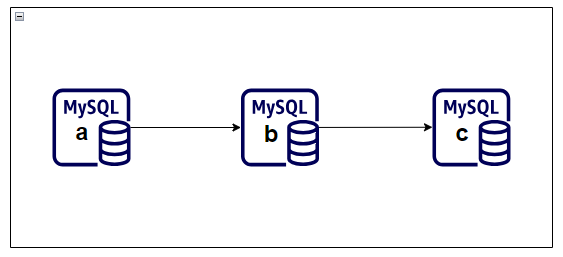
<p>In the example topology, <code class="language-plaintext highlighter-rouge">mysql-a</code> already replicates to <code class="language-plaintext highlighter-rouge">mysql-b</code>. Instead of building <code class="language-plaintext highlighter-rouge">mysql-c</code> directly from <code class="language-plaintext highlighter-rouge">mysql-a</code>, you can clone from <code class="language-plaintext highlighter-rouge">mysql-b</code> and then configure <code class="language-plaintext highlighter-rouge">mysql-c</code> to replicate downstream.</p>

<p><img src="/assets/images/mysql-replication-and-scalability/mysql-chain-replication-topology.png" alt="MySQL chain replication topology" /></p>

<p>That creates a chain topology:</p>

<div class="language-text highlighter-rouge"><div class="highlight"><pre class="highlight"><code>mysql-a -&gt; mysql-b -&gt; mysql-c
</code></pre></div></div>

<p>This can reduce operational pressure on the original source and give you more options for replica placement.</p>

<h2 id="step-1-install-the-clone-plugin">Step 1: Install the Clone Plugin</h2>

<p>Install the plugin on both the donor and the receiving replica.</p>

<div class="language-sql highlighter-rouge"><div class="highlight"><pre class="highlight"><code><span class="n">INSTALL</span> <span class="n">PLUGIN</span> <span class="n">clone</span> <span class="n">SONAME</span> <span class="s1">'mysql_clone.so'</span><span class="p">;</span>

<span class="k">SELECT</span> <span class="n">plugin_name</span><span class="p">,</span> <span class="n">plugin_status</span>
<span class="k">FROM</span> <span class="n">information_schema</span><span class="p">.</span><span class="n">plugins</span>
<span class="k">WHERE</span> <span class="n">plugin_name</span> <span class="o">=</span> <span class="s1">'clone'</span><span class="p">;</span>
</code></pre></div></div>

<p>You want the plugin status to return <code class="language-plaintext highlighter-rouge">ACTIVE</code>.</p>

<h2 id="step-2-create-a-donor-account">Step 2: Create a Donor Account</h2>

<p>Create a dedicated user for clone operations rather than reusing the replication account.</p>

<p>Example pattern:</p>

<div class="language-sql highlighter-rouge"><div class="highlight"><pre class="highlight"><code><span class="k">CREATE</span> <span class="k">USER</span> <span class="s1">'donor_clone_user'</span><span class="o">@</span><span class="s1">'mysql-c'</span> <span class="n">IDENTIFIED</span> <span class="k">BY</span> <span class="s1">'&lt;strong-password&gt;'</span><span class="p">;</span>
<span class="k">GRANT</span> <span class="k">ALL</span> <span class="k">PRIVILEGES</span> <span class="k">ON</span> <span class="o">*</span><span class="p">.</span><span class="o">*</span> <span class="k">TO</span> <span class="s1">'donor_clone_user'</span><span class="o">@</span><span class="s1">'mysql-c'</span><span class="p">;</span>
</code></pre></div></div>

<p>In a production environment, you would likely narrow both privileges and host scope more aggressively than a lab example.</p>

<h2 id="step-3-define-the-valid-donor-list">Step 3: Define the Valid Donor List</h2>

<p>On the receiving server, tell MySQL which donor host is allowed.</p>

<div class="language-sql highlighter-rouge"><div class="highlight"><pre class="highlight"><code><span class="k">SET</span> <span class="k">GLOBAL</span> <span class="n">clone_valid_donor_list</span><span class="o">=</span><span class="s1">'mysql-b:3306'</span><span class="p">;</span>
<span class="k">SHOW</span> <span class="n">VARIABLES</span> <span class="k">LIKE</span> <span class="s1">'%clone_valid%'</span><span class="p">;</span>
</code></pre></div></div>

<p>This prevents arbitrary clone sources from being used accidentally.</p>

<h2 id="step-4-run-the-clone-operation">Step 4: Run the Clone Operation</h2>

<p>Now clone the donor instance onto the new replica.</p>

<div class="language-sql highlighter-rouge"><div class="highlight"><pre class="highlight"><code><span class="n">CLONE</span> <span class="n">INSTANCE</span> <span class="k">FROM</span> <span class="s1">'donor_clone_user'</span><span class="o">@</span><span class="s1">'mysql-b'</span><span class="p">:</span><span class="mi">3306</span> <span class="n">IDENTIFIED</span> <span class="k">BY</span> <span class="s1">'&lt;strong-password&gt;'</span><span class="p">;</span>
</code></pre></div></div>

<p>The clone operation replaces existing user-created objects on the target and restarts MySQL as part of the workflow. Treat it as a provisioning action, not a casual maintenance command.</p>

<h2 id="step-5-reattach-replication">Step 5: Reattach Replication</h2>

<p>If GTID-based replication is already enabled, you can connect the cloned server to its upstream source without manually supplying binary log coordinates.</p>

<p>Example:</p>

<div class="language-sql highlighter-rouge"><div class="highlight"><pre class="highlight"><code><span class="n">CHANGE</span> <span class="n">REPLICATION</span> <span class="k">SOURCE</span> <span class="k">TO</span>
  <span class="n">SOURCE_HOST</span><span class="o">=</span><span class="s1">'mysql-b'</span><span class="p">,</span>
  <span class="n">SOURCE_PORT</span><span class="o">=</span><span class="mi">3306</span><span class="p">,</span>
  <span class="n">SOURCE_USER</span><span class="o">=</span><span class="s1">'replication_user'</span><span class="p">,</span>
  <span class="n">SOURCE_PASSWORD</span><span class="o">=</span><span class="s1">'&lt;strong-password&gt;'</span><span class="p">,</span>
  <span class="n">SOURCE_AUTO_POSITION</span><span class="o">=</span><span class="mi">1</span><span class="p">,</span>
  <span class="n">GET_SOURCE_PUBLIC_KEY</span><span class="o">=</span><span class="mi">1</span><span class="p">;</span>

<span class="k">START</span> <span class="n">REPLICA</span><span class="p">;</span>
<span class="k">SHOW</span> <span class="n">REPLICA</span> <span class="n">STATUS</span><span class="err">\</span><span class="k">G</span>
</code></pre></div></div>

<p>This is where GTID pays off again. The new replica can align based on executed transactions instead of a manually captured file position.</p>

<h2 id="step-6-validate-the-chain-topology">Step 6: Validate the Chain Topology</h2>

<p>To prove the scale-out path works, create a new object on <code class="language-plaintext highlighter-rouge">mysql-a</code> and verify that it appears on both downstream servers.</p>

<p>Example:</p>

<div class="language-sql highlighter-rouge"><div class="highlight"><pre class="highlight"><code><span class="k">CREATE</span> <span class="k">DATABASE</span> <span class="n">db8</span><span class="p">;</span>
</code></pre></div></div>

<p>Then verify on <code class="language-plaintext highlighter-rouge">mysql-b</code> and <code class="language-plaintext highlighter-rouge">mysql-c</code>:</p>

<div class="language-sql highlighter-rouge"><div class="highlight"><pre class="highlight"><code><span class="k">SHOW</span> <span class="n">DATABASES</span><span class="p">;</span>
</code></pre></div></div>

<p>If <code class="language-plaintext highlighter-rouge">db8</code> appears on both servers and the replica status remains healthy, the chained flow is working as expected.</p>

<h2 id="operational-notes">Operational Notes</h2>

<p>This pattern improves scalability, but it does not automatically solve failover orchestration, write conflict management, or split-brain prevention. Those concerns belong to a fuller high-availability design using tools such as InnoDB Cluster and related topologies.</p>

<p>Still, for read scaling and faster replica provisioning, clone plus GTID-based chained replication is a practical and effective pattern.</p>

<p>This closes this replication series. The next natural step is to move from replication and scale-out into the higher-level MySQL HA patterns built on top of them.</p>]]></content><author><name>Arun Samayam</name></author><category term="Database" /><category term="MySQL" /><category term="Scalability" /><category term="Clone Plugin" /><category term="Chain Replication" /><category term="GTID" /><category term="MySQL Administration" /><summary type="html"><![CDATA[Part 4 shows how to use the MySQL clone plugin and chained replication to provision additional replicas faster and scale read capacity beyond a single-source topology.]]></summary></entry><entry><title type="html">Practical MySQL Replication and Scalability - Part 3: Moving to GTID-Based Replication</title><link href="https://asamayam.github.io/posts/practical-mysql-replication-and-scalability-part-3/" rel="alternate" type="text/html" title="Practical MySQL Replication and Scalability - Part 3: Moving to GTID-Based Replication" /><published>2026-03-10T00:00:00+00:00</published><updated>2026-03-10T00:00:00+00:00</updated><id>https://asamayam.github.io/posts/practical-mysql-replication-and-scalability-part-3-moving-to-gtid-based-replication</id><content type="html" xml:base="https://asamayam.github.io/posts/practical-mysql-replication-and-scalability-part-3/"><![CDATA[<p>Part 3 moves the replication topology from manual file-position coordination to GTID-based auto-positioning.</p>

<p>If you have ever had to rebuild a replica under pressure, you already know the weakness of classic binlog coordinates: they work, but they add manual bookkeeping exactly when you want the process to be simpler. GTID reduces that operational burden.</p>

<h2 id="what-gtid-changes">What GTID Changes</h2>

<p>A GTID is a globally unique identifier attached to each committed transaction. Instead of asking a replica to start at a specific binary log byte offset, you ask it to continue from the transactions it has not yet executed.</p>

<p>Conceptually:</p>

<div class="language-text highlighter-rouge"><div class="highlight"><pre class="highlight"><code>GTID = source_uuid:transaction_id
</code></pre></div></div>

<p>That means the replica can synchronize based on transaction history rather than a human-tracked log coordinate.</p>

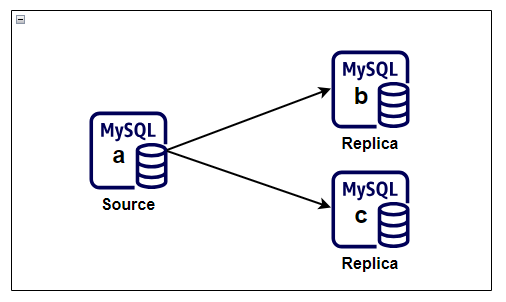
<p>In this GTID phase, the topology still uses one source and two replicas. The change is not the shape of the environment, but the way replicas determine where to resume replication.</p>

<p><img src="/assets/images/mysql-replication-and-scalability/mysql-source-to-two-replicas.png" alt="MySQL replication topology with one source and two replicas" /></p>

<h2 id="enable-gtid-on-the-source">Enable GTID on the Source</h2>

<p>The source must be started with GTID support enabled.</p>

<p>Example configuration:</p>

<div class="language-ini highlighter-rouge"><div class="highlight"><pre class="highlight"><code><span class="nn">[mysqld]</span>
<span class="py">log-bin</span><span class="p">=</span><span class="s">mysql-bin</span>
<span class="py">log-bin-index</span><span class="p">=</span><span class="s">mysql-bin.index</span>
<span class="py">server-id</span><span class="p">=</span><span class="s">1</span>
<span class="py">binlog-format</span><span class="p">=</span><span class="s">ROW</span>
<span class="py">innodb_flush_log_at_trx_commit</span><span class="p">=</span><span class="s">1</span>
<span class="py">sync-binlog</span><span class="p">=</span><span class="s">1</span>
<span class="py">gtid_mode</span><span class="p">=</span><span class="s">ON</span>
<span class="py">enforce_gtid_consistency</span><span class="p">=</span><span class="s">ON</span>
</code></pre></div></div>

<p><code class="language-plaintext highlighter-rouge">enforce_gtid_consistency=ON</code> prevents statements that would break GTID-safe replication semantics.</p>

<h2 id="enable-gtid-on-the-replicas">Enable GTID on the Replicas</h2>

<p>Each replica needs the same GTID-related settings, along with its existing relay log configuration.</p>

<p>Example:</p>

<div class="language-ini highlighter-rouge"><div class="highlight"><pre class="highlight"><code><span class="nn">[mysqld]</span>
<span class="py">server-id</span><span class="p">=</span><span class="s">2</span>
<span class="py">relay-log</span><span class="p">=</span><span class="s">relay-mysql-b</span>
<span class="py">relay-log-index</span><span class="p">=</span><span class="s">relay-mysql-b.index</span>
<span class="err">skip-slave-start</span>
<span class="py">gtid_mode</span><span class="p">=</span><span class="s">ON</span>
<span class="py">enforce_gtid_consistency</span><span class="p">=</span><span class="s">ON</span>
</code></pre></div></div>

<p>Repeat the same pattern on additional replicas, changing only the server-specific identifiers and relay log names.</p>

<h2 id="verify-gtid-settings-after-restart">Verify GTID Settings After Restart</h2>

<p>After restarting MySQL on each server, confirm that the required variables are active.</p>

<div class="language-sql highlighter-rouge"><div class="highlight"><pre class="highlight"><code><span class="k">SHOW</span> <span class="n">VARIABLES</span> <span class="k">LIKE</span> <span class="s1">'gtid_mode'</span><span class="p">;</span>
<span class="k">SHOW</span> <span class="n">VARIABLES</span> <span class="k">LIKE</span> <span class="s1">'enforce_gtid_consistency'</span><span class="p">;</span>
</code></pre></div></div>

<p>You want both variables to report <code class="language-plaintext highlighter-rouge">ON</code>.</p>

<h2 id="reconfigure-the-replica-to-use-auto-positioning">Reconfigure the Replica to Use Auto-Positioning</h2>

<p>Once GTID is enabled, change the replication source configuration to use transaction auto-positioning.</p>

<p>Example:</p>

<div class="language-sql highlighter-rouge"><div class="highlight"><pre class="highlight"><code><span class="n">CHANGE</span> <span class="n">REPLICATION</span> <span class="k">SOURCE</span> <span class="k">TO</span>
  <span class="n">SOURCE_HOST</span><span class="o">=</span><span class="s1">'10.0.0.10'</span><span class="p">,</span>
  <span class="n">SOURCE_USER</span><span class="o">=</span><span class="s1">'replication_user'</span><span class="p">,</span>
  <span class="n">SOURCE_PASSWORD</span><span class="o">=</span><span class="s1">'&lt;strong-password&gt;'</span><span class="p">,</span>
  <span class="n">SOURCE_AUTO_POSITION</span><span class="o">=</span><span class="mi">1</span><span class="p">,</span>
  <span class="n">GET_SOURCE_PUBLIC_KEY</span><span class="o">=</span><span class="mi">1</span><span class="p">;</span>
</code></pre></div></div>

<p>Then start replication:</p>

<div class="language-sql highlighter-rouge"><div class="highlight"><pre class="highlight"><code><span class="k">START</span> <span class="n">REPLICA</span><span class="p">;</span>
<span class="k">SHOW</span> <span class="n">REPLICA</span> <span class="n">STATUS</span><span class="err">\</span><span class="k">G</span>
</code></pre></div></div>

<h2 id="what-to-look-for-in-replica-status">What to Look for in Replica Status</h2>

<p>When the replica is healthy, these signals matter most:</p>

<ul>
  <li><code class="language-plaintext highlighter-rouge">Replica_IO_Running: Yes</code></li>
  <li><code class="language-plaintext highlighter-rouge">Replica_SQL_Running: Yes</code></li>
  <li><code class="language-plaintext highlighter-rouge">Auto_Position: 1</code></li>
  <li><code class="language-plaintext highlighter-rouge">Seconds_Behind_Source: 0</code> or near zero</li>
</ul>

<p>You can also inspect the GTID tracking fields:</p>

<ul>
  <li><code class="language-plaintext highlighter-rouge">Retrieved_Gtid_Set</code></li>
  <li><code class="language-plaintext highlighter-rouge">Executed_Gtid_Set</code></li>
</ul>

<p>These fields become especially useful when troubleshooting lag, reparenting, or partial recovery.</p>

<h2 id="why-gtid-is-usually-better">Why GTID Is Usually Better</h2>

<p>GTID-based replication is not magically simpler in every edge case, but it is much easier to operate day to day.</p>

<p>Main advantages:</p>

<ul>
  <li>No need to manually capture log file and position during every reprovision</li>
  <li>Easier replica rebuilds and source changes</li>
  <li>Better fit for automated failover or topology management tools</li>
  <li>Clearer transaction history tracking across servers</li>
</ul>

<h2 id="functional-validation">Functional Validation</h2>

<p>Once GTID replication is online, validate it the same way you validated binlog-based replication.</p>

<p>Example:</p>

<div class="language-sql highlighter-rouge"><div class="highlight"><pre class="highlight"><code><span class="k">CREATE</span> <span class="k">DATABASE</span> <span class="n">db4</span><span class="p">;</span>
<span class="k">CREATE</span> <span class="k">DATABASE</span> <span class="n">db5</span><span class="p">;</span>
</code></pre></div></div>

<p>Then confirm those changes appear on every replica.</p>

<p>If the databases arrive cleanly and <code class="language-plaintext highlighter-rouge">SHOW REPLICA STATUS\G</code> remains healthy, the topology is working under GTID.</p>

<p>In Part 4, I extend the discussion from replication into scalability by using the clone plugin and chained replication to build out additional capacity more efficiently.</p>]]></content><author><name>Arun Samayam</name></author><category term="Database" /><category term="MySQL" /><category term="GTID" /><category term="Replication" /><category term="MySQL 8.0" /><category term="Auto Positioning" /><category term="Database Administration" /><summary type="html"><![CDATA[Part 3 explains how to enable GTID replication in MySQL 8.0, reconfigure replicas for auto-positioning, and validate transaction-based synchronization.]]></summary></entry><entry><title type="html">Practical MySQL Replication and Scalability - Part 2: Bootstrapping Binlog Replicas</title><link href="https://asamayam.github.io/posts/practical-mysql-replication-and-scalability-part-2/" rel="alternate" type="text/html" title="Practical MySQL Replication and Scalability - Part 2: Bootstrapping Binlog Replicas" /><published>2026-02-23T00:00:00+00:00</published><updated>2026-02-23T00:00:00+00:00</updated><id>https://asamayam.github.io/posts/practical-mysql-replication-and-scalability-part-2-bootstrapping-binlog-replicas</id><content type="html" xml:base="https://asamayam.github.io/posts/practical-mysql-replication-and-scalability-part-2/"><![CDATA[<p>Part 2 focuses on the most operationally sensitive part of classic replication: provisioning replicas from a consistent source snapshot.</p>

<p>Once your source and replicas are configured correctly, the next job is to capture a known-good data state and align the replicas to the matching binary log position.</p>

<h2 id="step-1-confirm-the-source-is-ready">Step 1: Confirm the Source Is Ready</h2>

<p>Before taking a snapshot, verify that binary logging is enabled and that the source is healthy.</p>

<p>Useful checks:</p>

<div class="language-sql highlighter-rouge"><div class="highlight"><pre class="highlight"><code><span class="k">SHOW</span> <span class="n">VARIABLES</span> <span class="k">LIKE</span> <span class="s1">'log_bin'</span><span class="p">;</span>
<span class="k">SHOW</span> <span class="n">VARIABLES</span> <span class="k">LIKE</span> <span class="s1">'binlog_format'</span><span class="p">;</span>
<span class="k">SHOW</span> <span class="n">MASTER</span> <span class="n">STATUS</span><span class="p">;</span>
</code></pre></div></div>

<p>You should also verify that the replication user already exists and that network access from the replicas is possible.</p>

<h2 id="step-2-lock-the-source-long-enough-to-capture-coordinates">Step 2: Lock the Source Long Enough to Capture Coordinates</h2>

<p>To align the dump with a precise binary log position, place the source under a read lock, capture the coordinates, and keep the lock only as long as necessary.</p>

<div class="language-sql highlighter-rouge"><div class="highlight"><pre class="highlight"><code><span class="n">FLUSH</span> <span class="n">TABLES</span> <span class="k">WITH</span> <span class="k">READ</span> <span class="k">LOCK</span><span class="p">;</span>
<span class="k">SHOW</span> <span class="n">MASTER</span> <span class="n">STATUS</span><span class="p">;</span>
</code></pre></div></div>

<p>The output from <code class="language-plaintext highlighter-rouge">SHOW MASTER STATUS</code> gives you the two values the replicas need:</p>

<ul>
  <li><code class="language-plaintext highlighter-rouge">File</code></li>
  <li><code class="language-plaintext highlighter-rouge">Position</code></li>
</ul>

<p>Make a note of both before moving on.</p>

<h2 id="step-3-take-a-logical-backup">Step 3: Take a Logical Backup</h2>

<p>While the lock is in place, create the bootstrap dump from the source.</p>

<p>Example:</p>

<div class="language-bash highlighter-rouge"><div class="highlight"><pre class="highlight"><code>mysqldump <span class="nt">-uroot</span> <span class="nt">-p</span> <span class="se">\</span>
  <span class="nt">--all-databases</span> <span class="se">\</span>
  <span class="nt">--triggers</span> <span class="se">\</span>
  <span class="nt">--routines</span> <span class="se">\</span>
  <span class="nt">--events</span> <span class="se">\</span>
  <span class="nt">--source-data</span> <span class="se">\</span>
  <span class="nt">--set-gtid-purged</span><span class="o">=</span>OFF <span class="se">\</span>
  <span class="o">&gt;</span> replication_db_dump.sql
</code></pre></div></div>

<p>This combination works well for a full-environment bootstrap because it captures:</p>

<ul>
  <li>All databases</li>
  <li>Stored routines</li>
  <li>Events</li>
  <li>Triggers</li>
  <li>Source log metadata inside the dump file</li>
</ul>

<p>When the dump is complete, release the read lock:</p>

<div class="language-sql highlighter-rouge"><div class="highlight"><pre class="highlight"><code><span class="n">UNLOCK</span> <span class="n">TABLES</span><span class="p">;</span>
</code></pre></div></div>

<h2 id="step-4-load-the-snapshot-on-each-replica">Step 4: Load the Snapshot on Each Replica</h2>

<p>Copy the dump file to each replica and import it before enabling replication.</p>

<p>Example import flow:</p>

<div class="language-bash highlighter-rouge"><div class="highlight"><pre class="highlight"><code>mysql <span class="nt">-uroot</span> <span class="nt">-p</span> &lt; replication_db_dump.sql
</code></pre></div></div>

<p>At this point, the replica has the same logical data set as the source had at the captured binlog coordinate.</p>

<h2 id="step-5-point-each-replica-at-the-source">Step 5: Point Each Replica at the Source</h2>

<p>Now configure replication using the recorded binary log file and position.</p>

<p>Example:</p>

<div class="language-sql highlighter-rouge"><div class="highlight"><pre class="highlight"><code><span class="n">CHANGE</span> <span class="n">REPLICATION</span> <span class="k">SOURCE</span> <span class="k">TO</span>
  <span class="n">SOURCE_HOST</span><span class="o">=</span><span class="s1">'10.0.0.10'</span><span class="p">,</span>
  <span class="n">SOURCE_USER</span><span class="o">=</span><span class="s1">'replication_user'</span><span class="p">,</span>
  <span class="n">SOURCE_PASSWORD</span><span class="o">=</span><span class="s1">'&lt;strong-password&gt;'</span><span class="p">,</span>
  <span class="n">SOURCE_LOG_FILE</span><span class="o">=</span><span class="s1">'mysql-bin.000001'</span><span class="p">,</span>
  <span class="n">SOURCE_LOG_POS</span><span class="o">=</span><span class="mi">1482</span><span class="p">,</span>
  <span class="n">GET_SOURCE_PUBLIC_KEY</span><span class="o">=</span><span class="mi">1</span><span class="p">;</span>
</code></pre></div></div>

<p>If you are working with older syntax or legacy automation, you may still see <code class="language-plaintext highlighter-rouge">CHANGE MASTER TO</code>. On current MySQL 8.0 builds, <code class="language-plaintext highlighter-rouge">CHANGE REPLICATION SOURCE TO</code> is the preferred form.</p>

<h2 id="step-6-start-replication">Step 6: Start Replication</h2>

<p>Once the source coordinates are configured, start the replica threads.</p>

<div class="language-sql highlighter-rouge"><div class="highlight"><pre class="highlight"><code><span class="k">START</span> <span class="n">REPLICA</span><span class="p">;</span>
<span class="k">SHOW</span> <span class="n">REPLICA</span> <span class="n">STATUS</span><span class="err">\</span><span class="k">G</span>
</code></pre></div></div>

<p>These fields matter most during first validation:</p>

<ul>
  <li><code class="language-plaintext highlighter-rouge">Replica_IO_Running: Yes</code></li>
  <li><code class="language-plaintext highlighter-rouge">Replica_SQL_Running: Yes</code></li>
  <li><code class="language-plaintext highlighter-rouge">Seconds_Behind_Source: 0</code> or a small transient value</li>
  <li><code class="language-plaintext highlighter-rouge">Replica_SQL_Running_State</code> showing the replica has caught up and is waiting for new events</li>
</ul>

<h2 id="step-7-validate-end-to-end-replication">Step 7: Validate End-to-End Replication</h2>

<p>A simple validation pattern is to create test objects on the source and confirm that they appear on each replica.</p>

<p>Example:</p>

<div class="language-sql highlighter-rouge"><div class="highlight"><pre class="highlight"><code><span class="k">CREATE</span> <span class="k">DATABASE</span> <span class="n">db1</span><span class="p">;</span>
<span class="k">CREATE</span> <span class="k">DATABASE</span> <span class="n">db2</span><span class="p">;</span>
<span class="k">CREATE</span> <span class="k">DATABASE</span> <span class="n">db3</span><span class="p">;</span>
</code></pre></div></div>

<p>Then on a replica:</p>

<div class="language-sql highlighter-rouge"><div class="highlight"><pre class="highlight"><code><span class="k">SHOW</span> <span class="n">DATABASES</span><span class="p">;</span>
</code></pre></div></div>

<p>If you want a stronger test, create a table and insert a few rows, then verify both schema and data replication.</p>

<h2 id="common-failure-points">Common Failure Points</h2>

<p>If the replica does not start cleanly, check these first:</p>

<ul>
  <li>Wrong source host or port</li>
  <li>Incorrect replication credentials</li>
  <li>Wrong <code class="language-plaintext highlighter-rouge">SOURCE_LOG_FILE</code> or <code class="language-plaintext highlighter-rouge">SOURCE_LOG_POS</code></li>
  <li>Duplicate <code class="language-plaintext highlighter-rouge">server-id</code> or <code class="language-plaintext highlighter-rouge">server_uuid</code></li>
  <li>Firewall or network path issues</li>
</ul>

<p>Binlog-based replication is reliable, but it demands careful coordinate handling. That manual dependency is exactly why many teams prefer GTID once the baseline topology is working.</p>

<p>In Part 3, I move the same topology to GTID-based replication and show how auto-positioning simplifies source alignment.</p>]]></content><author><name>Arun Samayam</name></author><category term="Database" /><category term="MySQL" /><category term="Replication" /><category term="Binlog Replication" /><category term="mysqldump" /><category term="Replica Setup" /><category term="MySQL Administration" /><summary type="html"><![CDATA[Part 2 covers the practical bootstrap workflow for binlog-based MySQL replication, including snapshot capture, binary log coordinates, replica initialization, and validation checks.]]></summary></entry><entry><title type="html">Practical MySQL Replication and Scalability - Part 1: Replication Models and Binlog Prerequisites</title><link href="https://asamayam.github.io/posts/practical-mysql-replication-and-scalability-part-1/" rel="alternate" type="text/html" title="Practical MySQL Replication and Scalability - Part 1: Replication Models and Binlog Prerequisites" /><published>2026-02-08T00:00:00+00:00</published><updated>2026-02-08T00:00:00+00:00</updated><id>https://asamayam.github.io/posts/practical-mysql-replication-and-scalability-part-1-replication-models-and-binlog-prerequisites</id><content type="html" xml:base="https://asamayam.github.io/posts/practical-mysql-replication-and-scalability-part-1/"><![CDATA[<p>Part 1 starts the next MySQL series with the fundamentals behind replication and scale-out planning.</p>

<p>When teams talk about MySQL high availability, they often jump straight to failover tooling. Before that, it helps to understand how replication actually moves data, what assumptions it depends on, and which server settings must be correct before you bootstrap replicas.</p>

<h2 id="why-replication-matters">Why Replication Matters</h2>

<p>MySQL replication is commonly used for four practical outcomes:</p>

<ul>
  <li>Scale-out read traffic across multiple servers</li>
  <li>Keep analytical or reporting workloads away from the primary write path</li>
  <li>Distribute data closer to remote users or applications</li>
  <li>Improve resilience by maintaining additional synchronized copies of data</li>
</ul>

<p>Replication by itself is not a full high-availability strategy, but it is the base layer that most HA designs build on.</p>

<h2 id="binlog-position-vs-gtid-replication">Binlog Position vs GTID Replication</h2>

<p>MySQL 8.0 supports two mainstream replication approaches.</p>

<h3 id="binlog-position-based-replication">Binlog Position-Based Replication</h3>

<p>This is the traditional model. Replicas connect to the source and start reading changes from a specific binary log file and position.</p>

<p>That means you need two pieces of state when configuring the replica:</p>

<ul>
  <li>The source binary log file name</li>
  <li>The byte position within that binary log</li>
</ul>

<p>This method works well, but it is more manual during provisioning and recovery.</p>

<h3 id="gtid-based-replication">GTID-Based Replication</h3>

<p>GTID replication assigns a unique transaction identifier to each committed transaction. Instead of telling a replica where to start in a log file, you tell it to auto-position based on executed transaction history.</p>

<p>A GTID looks like this:</p>

<div class="language-text highlighter-rouge"><div class="highlight"><pre class="highlight"><code>source_uuid:transaction_id
</code></pre></div></div>

<p>GTID-based replication is usually the better operational choice because it reduces manual coordination and makes source changes easier to reason about.</p>

<h2 id="high-level-overview">High-Level Overview</h2>

<p>This series uses a simple topology with one source and two replicas. The same shape supports the initial binlog-based setup before moving to GTID-based auto-positioning later in the series.</p>

<p><img src="/assets/images/mysql-replication-and-scalability/mysql-source-to-two-replicas.png" alt="MySQL replication topology with one source and two replicas" /></p>

<h2 id="baseline-prerequisites">Baseline Prerequisites</h2>

<p>Before configuring replicas, verify the following across the topology:</p>

<ul>
  <li>Binary logging is enabled on the source</li>
  <li>Every server has a unique <code class="language-plaintext highlighter-rouge">server-id</code></li>
  <li>Every server has a unique <code class="language-plaintext highlighter-rouge">server_uuid</code></li>
  <li>Replicas can reach the source over the network</li>
  <li>A dedicated replication user exists on the source</li>
</ul>

<p>One of the easiest mistakes in cloned lab environments is duplicated UUID metadata. If multiple servers were copied from the same image, validate UUID uniqueness immediately.</p>

<p>Checks to run:</p>

<div class="language-sql highlighter-rouge"><div class="highlight"><pre class="highlight"><code><span class="k">SELECT</span> <span class="o">@@</span><span class="n">server_id</span><span class="p">;</span>
<span class="k">SELECT</span> <span class="o">@@</span><span class="n">server_uuid</span><span class="p">;</span>
<span class="k">SHOW</span> <span class="n">VARIABLES</span> <span class="k">LIKE</span> <span class="s1">'skip_networking'</span><span class="p">;</span>
</code></pre></div></div>

<p>If <code class="language-plaintext highlighter-rouge">skip_networking</code> is <code class="language-plaintext highlighter-rouge">ON</code>, the replica will not be able to connect to the source over TCP.</p>

<h2 id="source-configuration-for-binlog-replication">Source Configuration for Binlog Replication</h2>

<p>On the source server, the MySQL configuration needs durable binary logging behavior and a unique identifier.</p>

<p>Example configuration:</p>

<div class="language-ini highlighter-rouge"><div class="highlight"><pre class="highlight"><code><span class="nn">[mysqld]</span>
<span class="py">log-bin</span><span class="p">=</span><span class="s">mysql-bin</span>
<span class="py">log-bin-index</span><span class="p">=</span><span class="s">mysql-bin.index</span>
<span class="py">server-id</span><span class="p">=</span><span class="s">1</span>
<span class="py">binlog-format</span><span class="p">=</span><span class="s">ROW</span>
<span class="py">innodb_flush_log_at_trx_commit</span><span class="p">=</span><span class="s">1</span>
<span class="py">sync-binlog</span><span class="p">=</span><span class="s">1</span>
</code></pre></div></div>

<p><code class="language-plaintext highlighter-rouge">ROW</code> format is the safer default for modern replication because it avoids a number of ambiguity issues found in statement-based logging.</p>

<h2 id="replica-configuration-basics">Replica Configuration Basics</h2>

<p>Each replica needs its own server ID and relay log settings.</p>

<p>Example configuration:</p>

<div class="language-ini highlighter-rouge"><div class="highlight"><pre class="highlight"><code><span class="nn">[mysqld]</span>
<span class="py">server-id</span><span class="p">=</span><span class="s">2</span>
<span class="py">relay-log</span><span class="p">=</span><span class="s">relay-mysql-b</span>
<span class="py">relay-log-index</span><span class="p">=</span><span class="s">relay-mysql-b.index</span>
<span class="err">skip-slave-start</span>
</code></pre></div></div>

<p>For a second replica, keep the same structure but assign a different <code class="language-plaintext highlighter-rouge">server-id</code> and relay log name.</p>

<p><code class="language-plaintext highlighter-rouge">skip-slave-start</code> is useful during initial provisioning because it prevents replication from starting before the configuration is complete.</p>

<h2 id="handling-duplicate-server-uuids">Handling Duplicate Server UUIDs</h2>

<p>If two servers report the same <code class="language-plaintext highlighter-rouge">@@server_uuid</code>, stop MySQL on the affected replica, remove or move the <code class="language-plaintext highlighter-rouge">auto.cnf</code> file, and start MySQL again so a fresh UUID is generated.</p>

<p>Example flow:</p>

<div class="language-bash highlighter-rouge"><div class="highlight"><pre class="highlight"><code><span class="nb">sudo </span>systemctl stop mysqld
<span class="nb">sudo mv</span> /var/lib/mysql/auto.cnf /tmp/auto.cnf.backup
<span class="nb">sudo </span>systemctl start mysqld
</code></pre></div></div>

<p>Then verify:</p>

<div class="language-sql highlighter-rouge"><div class="highlight"><pre class="highlight"><code><span class="k">SELECT</span> <span class="o">@@</span><span class="n">server_uuid</span><span class="p">;</span>
</code></pre></div></div>

<h2 id="creating-a-dedicated-replication-user">Creating a Dedicated Replication User</h2>

<p>Create a dedicated account on the source instead of reusing an administrative login.</p>

<p>Example pattern:</p>

<div class="language-sql highlighter-rouge"><div class="highlight"><pre class="highlight"><code><span class="k">CREATE</span> <span class="k">USER</span> <span class="s1">'replication_user'</span><span class="o">@</span><span class="s1">'10.0.0.%'</span> <span class="n">IDENTIFIED</span> <span class="k">BY</span> <span class="s1">'&lt;strong-password&gt;'</span><span class="p">;</span>
<span class="k">GRANT</span> <span class="n">REPLICATION</span> <span class="n">SLAVE</span> <span class="k">ON</span> <span class="o">*</span><span class="p">.</span><span class="o">*</span> <span class="k">TO</span> <span class="s1">'replication_user'</span><span class="o">@</span><span class="s1">'10.0.0.%'</span><span class="p">;</span>
<span class="n">FLUSH</span> <span class="k">PRIVILEGES</span><span class="p">;</span>
</code></pre></div></div>

<p>Use the narrowest host specification that fits your environment. Avoid <code class="language-plaintext highlighter-rouge">%</code> when you know the replica subnet or host list.</p>

<h2 id="what-comes-next">What Comes Next</h2>

<p>At this stage, the source and replicas are prepared, but data has not yet been synchronized. In Part 2, I walk through the bootstrap flow for binlog-based replication: capturing a consistent snapshot, recording binary log coordinates, loading the snapshot on replicas, and starting replication cleanly.</p>]]></content><author><name>Arun Samayam</name></author><category term="Database" /><category term="MySQL" /><category term="Replication" /><category term="Binlog Replication" /><category term="GTID" /><category term="MySQL Administration" /><category term="Database Administration" /><summary type="html"><![CDATA[Part 1 introduces MySQL replication use cases, compares binlog position and GTID-based replication, and walks through the baseline prerequisites for a healthy source-replica topology.]]></summary></entry><entry><title type="html">Practical MySQL Tablespace and Partitioning - Part 6: COLUMNS, HASH, KEY, and Subpartitioning</title><link href="https://asamayam.github.io/posts/practical-mysql-tablespace-and-partitioning-part-6/" rel="alternate" type="text/html" title="Practical MySQL Tablespace and Partitioning - Part 6: COLUMNS, HASH, KEY, and Subpartitioning" /><published>2026-01-31T00:00:00+00:00</published><updated>2026-01-31T00:00:00+00:00</updated><id>https://asamayam.github.io/posts/practical-mysql-tablespace-and-partitioning-part-6-columns-hash-key-and-subpartitioning</id><content type="html" xml:base="https://asamayam.github.io/posts/practical-mysql-tablespace-and-partitioning-part-6/"><![CDATA[<p>Part 6 closes this partitioning series with advanced partitioning patterns.</p>

<p>These methods are useful when RANGE/LIST alone do not match the distribution characteristics of your workload.</p>

<h2 id="1-columns-partitioning">1. COLUMNS Partitioning</h2>

<p>COLUMNS partitioning extends RANGE/LIST concepts to multiple columns and supports non-integer types such as date values.</p>

<p>Example pattern:</p>

<div class="language-sql highlighter-rouge"><div class="highlight"><pre class="highlight"><code><span class="k">CREATE</span> <span class="k">TABLE</span> <span class="n">emp_columns</span> <span class="p">(</span>
  <span class="n">id</span> <span class="nb">INT</span> <span class="k">NOT</span> <span class="k">NULL</span><span class="p">,</span>
  <span class="n">fname</span> <span class="nb">VARCHAR</span><span class="p">(</span><span class="mi">30</span><span class="p">),</span>
  <span class="n">lname</span> <span class="nb">VARCHAR</span><span class="p">(</span><span class="mi">30</span><span class="p">),</span>
  <span class="n">hired</span> <span class="nb">DATE</span> <span class="k">NOT</span> <span class="k">NULL</span> <span class="k">DEFAULT</span> <span class="s1">'2023-01-01'</span><span class="p">,</span>
  <span class="k">position</span> <span class="nb">INT</span> <span class="k">NOT</span> <span class="k">NULL</span><span class="p">,</span>
  <span class="n">fired</span> <span class="nb">VARCHAR</span><span class="p">(</span><span class="mi">5</span><span class="p">)</span> <span class="k">NOT</span> <span class="k">NULL</span> <span class="k">DEFAULT</span> <span class="s1">'No'</span><span class="p">,</span>
  <span class="n">dep_id</span> <span class="nb">INT</span> <span class="k">NOT</span> <span class="k">NULL</span>
<span class="p">)</span>
<span class="k">PARTITION</span> <span class="k">BY</span> <span class="k">RANGE</span> <span class="n">COLUMNS</span><span class="p">(</span><span class="n">fname</span><span class="p">,</span><span class="n">lname</span><span class="p">,</span><span class="n">hired</span><span class="p">)</span> <span class="p">(</span>
  <span class="k">PARTITION</span> <span class="n">p1</span> <span class="k">VALUES</span> <span class="k">LESS</span> <span class="k">THAN</span> <span class="p">(</span><span class="s1">'a'</span><span class="p">,</span><span class="s1">'a'</span><span class="p">,</span><span class="s1">'2023-02-02'</span><span class="p">),</span>
  <span class="k">PARTITION</span> <span class="n">p2</span> <span class="k">VALUES</span> <span class="k">LESS</span> <span class="k">THAN</span> <span class="p">(</span><span class="s1">'z'</span><span class="p">,</span><span class="s1">'z'</span><span class="p">,</span><span class="s1">'2099-12-31'</span><span class="p">)</span>
<span class="p">);</span>
</code></pre></div></div>

<h2 id="2-hash-partitioning">2. HASH Partitioning</h2>

<p>HASH distributes rows using a user-defined expression.</p>

<div class="language-sql highlighter-rouge"><div class="highlight"><pre class="highlight"><code><span class="k">CREATE</span> <span class="k">TABLE</span> <span class="n">emp_hash</span> <span class="p">(</span>
  <span class="n">id</span> <span class="nb">INT</span> <span class="k">NOT</span> <span class="k">NULL</span><span class="p">,</span>
  <span class="n">fname</span> <span class="nb">VARCHAR</span><span class="p">(</span><span class="mi">30</span><span class="p">),</span>
  <span class="n">lname</span> <span class="nb">VARCHAR</span><span class="p">(</span><span class="mi">30</span><span class="p">),</span>
  <span class="n">hired</span> <span class="nb">DATE</span> <span class="k">NOT</span> <span class="k">NULL</span> <span class="k">DEFAULT</span> <span class="s1">'2023-01-01'</span><span class="p">,</span>
  <span class="k">position</span> <span class="nb">INT</span> <span class="k">NOT</span> <span class="k">NULL</span><span class="p">,</span>
  <span class="n">fired</span> <span class="nb">VARCHAR</span><span class="p">(</span><span class="mi">5</span><span class="p">)</span> <span class="k">NOT</span> <span class="k">NULL</span> <span class="k">DEFAULT</span> <span class="s1">'No'</span><span class="p">,</span>
  <span class="n">dep_id</span> <span class="nb">INT</span> <span class="k">NOT</span> <span class="k">NULL</span>
<span class="p">)</span>
<span class="k">PARTITION</span> <span class="k">BY</span> <span class="n">HASH</span><span class="p">(</span><span class="n">id</span><span class="p">)</span>
<span class="n">PARTITIONS</span> <span class="mi">5</span><span class="p">;</span>
</code></pre></div></div>

<p>Check spread:</p>

<div class="language-sql highlighter-rouge"><div class="highlight"><pre class="highlight"><code><span class="k">SELECT</span> <span class="n">partition_name</span><span class="p">,</span> <span class="n">table_rows</span>
<span class="k">FROM</span> <span class="n">information_schema</span><span class="p">.</span><span class="n">partitions</span>
<span class="k">WHERE</span> <span class="k">table_name</span><span class="o">=</span><span class="s1">'emp_hash'</span><span class="p">;</span>
</code></pre></div></div>

<h2 id="3-key-partitioning">3. KEY Partitioning</h2>

<p>KEY partitioning uses MySQL’s internal hashing logic instead of a user-defined hash expression.</p>

<div class="language-sql highlighter-rouge"><div class="highlight"><pre class="highlight"><code><span class="k">CREATE</span> <span class="k">TABLE</span> <span class="n">emp_key</span> <span class="p">(</span>
  <span class="n">id</span> <span class="nb">INT</span> <span class="k">NOT</span> <span class="k">NULL</span> <span class="k">PRIMARY</span> <span class="k">KEY</span><span class="p">,</span>
  <span class="n">fname</span> <span class="nb">VARCHAR</span><span class="p">(</span><span class="mi">30</span><span class="p">),</span>
  <span class="n">lname</span> <span class="nb">VARCHAR</span><span class="p">(</span><span class="mi">30</span><span class="p">),</span>
  <span class="n">hired</span> <span class="nb">DATE</span> <span class="k">NOT</span> <span class="k">NULL</span> <span class="k">DEFAULT</span> <span class="s1">'2023-01-01'</span><span class="p">,</span>
  <span class="k">position</span> <span class="nb">INT</span> <span class="k">NOT</span> <span class="k">NULL</span><span class="p">,</span>
  <span class="n">fired</span> <span class="nb">VARCHAR</span><span class="p">(</span><span class="mi">5</span><span class="p">)</span> <span class="k">NOT</span> <span class="k">NULL</span> <span class="k">DEFAULT</span> <span class="s1">'No'</span><span class="p">,</span>
  <span class="n">dep_id</span> <span class="nb">INT</span> <span class="k">NOT</span> <span class="k">NULL</span>
<span class="p">)</span>
<span class="k">PARTITION</span> <span class="k">BY</span> <span class="k">KEY</span><span class="p">()</span>
<span class="n">PARTITIONS</span> <span class="mi">4</span><span class="p">;</span>
</code></pre></div></div>

<h2 id="4-subpartitioning-composite-partitioning">4. Subpartitioning (Composite Partitioning)</h2>

<p>Subpartitioning means partitions within partitions.</p>

<p>Example structure:</p>

<div class="language-sql highlighter-rouge"><div class="highlight"><pre class="highlight"><code><span class="k">CREATE</span> <span class="k">TABLE</span> <span class="n">emp_subpart</span> <span class="p">(</span>
  <span class="n">bill_no</span> <span class="nb">INT</span><span class="p">,</span>
  <span class="n">sale_date</span> <span class="nb">DATE</span><span class="p">,</span>
  <span class="n">cust_code</span> <span class="nb">VARCHAR</span><span class="p">(</span><span class="mi">15</span><span class="p">),</span>
  <span class="n">amount</span> <span class="nb">DECIMAL</span><span class="p">(</span><span class="mi">8</span><span class="p">,</span><span class="mi">2</span><span class="p">)</span>
<span class="p">)</span>
<span class="k">PARTITION</span> <span class="k">BY</span> <span class="k">RANGE</span> <span class="p">(</span><span class="nb">YEAR</span><span class="p">(</span><span class="n">sale_date</span><span class="p">))</span>
<span class="n">SUBPARTITION</span> <span class="k">BY</span> <span class="n">HASH</span> <span class="p">(</span><span class="n">TO_DAYS</span><span class="p">(</span><span class="n">sale_date</span><span class="p">))</span>
<span class="n">SUBPARTITIONS</span> <span class="mi">4</span> <span class="p">(</span>
  <span class="k">PARTITION</span> <span class="n">p0</span> <span class="k">VALUES</span> <span class="k">LESS</span> <span class="k">THAN</span> <span class="p">(</span><span class="mi">1990</span><span class="p">),</span>
  <span class="k">PARTITION</span> <span class="n">p1</span> <span class="k">VALUES</span> <span class="k">LESS</span> <span class="k">THAN</span> <span class="p">(</span><span class="mi">2000</span><span class="p">),</span>
  <span class="k">PARTITION</span> <span class="n">p2</span> <span class="k">VALUES</span> <span class="k">LESS</span> <span class="k">THAN</span> <span class="p">(</span><span class="mi">2010</span><span class="p">),</span>
  <span class="k">PARTITION</span> <span class="n">p3</span> <span class="k">VALUES</span> <span class="k">LESS</span> <span class="k">THAN</span> <span class="k">MAXVALUE</span>
<span class="p">);</span>
</code></pre></div></div>

<p>Inspect partition/subpartition metadata:</p>

<div class="language-sql highlighter-rouge"><div class="highlight"><pre class="highlight"><code><span class="k">SELECT</span> <span class="n">partition_name</span><span class="p">,</span> <span class="n">table_rows</span>
<span class="k">FROM</span> <span class="n">information_schema</span><span class="p">.</span><span class="n">partitions</span>
<span class="k">WHERE</span> <span class="k">table_name</span><span class="o">=</span><span class="s1">'emp_subpart'</span><span class="p">;</span>
</code></pre></div></div>

<h2 id="operational-wrap-up">Operational Wrap-Up</h2>

<p>Across this post, the most useful pattern is consistent verification after each DDL change:</p>

<ul>
  <li><code class="language-plaintext highlighter-rouge">information_schema.partitions</code></li>
  <li><code class="language-plaintext highlighter-rouge">information_schema.files</code></li>
  <li><code class="language-plaintext highlighter-rouge">SHOW VARIABLES</code> checks</li>
  <li><code class="language-plaintext highlighter-rouge">EXPLAIN</code> for partition-aware query behavior</li>
</ul>

<p>This closes the practical tablespace and partitioning series. In the next post flow, I move to high availability and replication topics.</p>]]></content><author><name>Arun Samayam</name></author><category term="Database" /><category term="MySQL" /><category term="Partitioning" /><category term="COLUMNS Partitioning" /><category term="HASH Partitioning" /><category term="KEY Partitioning" /><category term="Subpartitioning" /><category term="MySQL Administration" /><summary type="html"><![CDATA[Part 6 covers advanced partitioning patterns in MySQL, including COLUMNS, HASH, KEY, and composite subpartitioning with verification workflows.]]></summary></entry><entry><title type="html">Practical MySQL Tablespace and Partitioning - Part 5: RANGE and LIST Partitioning</title><link href="https://asamayam.github.io/posts/practical-mysql-tablespace-and-partitioning-part-5/" rel="alternate" type="text/html" title="Practical MySQL Tablespace and Partitioning - Part 5: RANGE and LIST Partitioning" /><published>2026-01-16T00:00:00+00:00</published><updated>2026-01-16T00:00:00+00:00</updated><id>https://asamayam.github.io/posts/practical-mysql-tablespace-and-partitioning-part-5-range-and-list-partitioning</id><content type="html" xml:base="https://asamayam.github.io/posts/practical-mysql-tablespace-and-partitioning-part-5/"><![CDATA[<p>Part 5 starts the partitioning half of the series.</p>

<p>Partitioning helps when large datasets need predictable pruning boundaries and easier lifecycle operations. In this part, I focus on RANGE and LIST because they are usually the first practical patterns teams adopt.</p>

<h2 id="range-partitioning-basics">RANGE Partitioning Basics</h2>

<p>Example table definition:</p>

<div class="language-sql highlighter-rouge"><div class="highlight"><pre class="highlight"><code><span class="k">CREATE</span> <span class="k">TABLE</span> <span class="n">emp_range</span> <span class="p">(</span>
  <span class="n">id</span> <span class="nb">INT</span> <span class="k">NOT</span> <span class="k">NULL</span><span class="p">,</span>
  <span class="n">fname</span> <span class="nb">VARCHAR</span><span class="p">(</span><span class="mi">30</span><span class="p">),</span>
  <span class="n">lname</span> <span class="nb">VARCHAR</span><span class="p">(</span><span class="mi">30</span><span class="p">),</span>
  <span class="n">hired</span> <span class="nb">DATE</span> <span class="k">NOT</span> <span class="k">NULL</span> <span class="k">DEFAULT</span> <span class="s1">'2023-01-01'</span><span class="p">,</span>
  <span class="k">position</span> <span class="nb">INT</span> <span class="k">NOT</span> <span class="k">NULL</span><span class="p">,</span>
  <span class="n">fired</span> <span class="nb">VARCHAR</span><span class="p">(</span><span class="mi">5</span><span class="p">)</span> <span class="k">NOT</span> <span class="k">NULL</span> <span class="k">DEFAULT</span> <span class="s1">'No'</span>
<span class="p">)</span>
<span class="k">PARTITION</span> <span class="k">BY</span> <span class="k">RANGE</span> <span class="p">(</span><span class="n">id</span><span class="p">)</span> <span class="p">(</span>
  <span class="k">PARTITION</span> <span class="n">p0</span> <span class="k">VALUES</span> <span class="k">LESS</span> <span class="k">THAN</span> <span class="p">(</span><span class="mi">5</span><span class="p">),</span>
  <span class="k">PARTITION</span> <span class="n">p1</span> <span class="k">VALUES</span> <span class="k">LESS</span> <span class="k">THAN</span> <span class="p">(</span><span class="mi">10</span><span class="p">),</span>
  <span class="k">PARTITION</span> <span class="n">p2</span> <span class="k">VALUES</span> <span class="k">LESS</span> <span class="k">THAN</span> <span class="p">(</span><span class="mi">15</span><span class="p">),</span>
  <span class="k">PARTITION</span> <span class="n">p3</span> <span class="k">VALUES</span> <span class="k">LESS</span> <span class="k">THAN</span> <span class="p">(</span><span class="mi">20</span><span class="p">)</span>
<span class="p">);</span>
</code></pre></div></div>

<p>Inspect distribution:</p>

<div class="language-sql highlighter-rouge"><div class="highlight"><pre class="highlight"><code><span class="k">SELECT</span> <span class="n">partition_name</span><span class="p">,</span> <span class="n">table_rows</span>
<span class="k">FROM</span> <span class="n">information_schema</span><span class="p">.</span><span class="n">partitions</span>
<span class="k">WHERE</span> <span class="k">table_name</span><span class="o">=</span><span class="s1">'emp_range'</span><span class="p">;</span>
</code></pre></div></div>

<h2 id="common-range-error-and-fix">Common RANGE Error and Fix</h2>

<p>Inserting value outside defined ranges can fail:</p>

<div class="language-text highlighter-rouge"><div class="highlight"><pre class="highlight"><code>ERROR 1526 (HY000): Table has no partition for value 23
</code></pre></div></div>

<p>Add catch-all partition:</p>

<div class="language-sql highlighter-rouge"><div class="highlight"><pre class="highlight"><code><span class="k">ALTER</span> <span class="k">TABLE</span> <span class="n">emp_range</span>
<span class="k">ADD</span> <span class="k">PARTITION</span> <span class="p">(</span><span class="k">PARTITION</span> <span class="n">p4</span> <span class="k">VALUES</span> <span class="k">LESS</span> <span class="k">THAN</span> <span class="k">MAXVALUE</span><span class="p">);</span>
</code></pre></div></div>

<h2 id="list-partitioning-basics">LIST Partitioning Basics</h2>

<p>LIST uses explicit value sets per partition.</p>

<div class="language-sql highlighter-rouge"><div class="highlight"><pre class="highlight"><code><span class="k">CREATE</span> <span class="k">TABLE</span> <span class="n">emp_list</span> <span class="p">(</span>
  <span class="n">id</span> <span class="nb">INT</span> <span class="k">NOT</span> <span class="k">NULL</span><span class="p">,</span>
  <span class="n">fname</span> <span class="nb">VARCHAR</span><span class="p">(</span><span class="mi">30</span><span class="p">),</span>
  <span class="n">lname</span> <span class="nb">VARCHAR</span><span class="p">(</span><span class="mi">30</span><span class="p">),</span>
  <span class="n">hired</span> <span class="nb">DATE</span> <span class="k">NOT</span> <span class="k">NULL</span> <span class="k">DEFAULT</span> <span class="s1">'2023-01-01'</span><span class="p">,</span>
  <span class="k">position</span> <span class="nb">INT</span> <span class="k">NOT</span> <span class="k">NULL</span><span class="p">,</span>
  <span class="n">fired</span> <span class="nb">VARCHAR</span><span class="p">(</span><span class="mi">5</span><span class="p">)</span> <span class="k">NOT</span> <span class="k">NULL</span> <span class="k">DEFAULT</span> <span class="s1">'No'</span><span class="p">,</span>
  <span class="n">dep_id</span> <span class="nb">INT</span> <span class="k">NOT</span> <span class="k">NULL</span>
<span class="p">)</span>
<span class="k">PARTITION</span> <span class="k">BY</span> <span class="n">LIST</span><span class="p">(</span><span class="n">dep_id</span><span class="p">)</span> <span class="p">(</span>
  <span class="k">PARTITION</span> <span class="n">first_dep</span> <span class="k">VALUES</span> <span class="k">IN</span> <span class="p">(</span><span class="mi">3</span><span class="p">,</span><span class="mi">5</span><span class="p">,</span><span class="mi">20</span><span class="p">),</span>
  <span class="k">PARTITION</span> <span class="n">second_dep</span> <span class="k">VALUES</span> <span class="k">IN</span> <span class="p">(</span><span class="mi">25</span><span class="p">,</span><span class="mi">50</span><span class="p">,</span><span class="mi">75</span><span class="p">),</span>
  <span class="k">PARTITION</span> <span class="n">third_dep</span> <span class="k">VALUES</span> <span class="k">IN</span> <span class="p">(</span><span class="mi">80</span><span class="p">,</span><span class="mi">85</span><span class="p">,</span><span class="mi">90</span><span class="p">,</span><span class="mi">100</span><span class="p">,</span><span class="mi">120</span><span class="p">,</span><span class="mi">140</span><span class="p">,</span><span class="mi">150</span><span class="p">)</span>
<span class="p">);</span>
</code></pre></div></div>

<p>Out-of-list values trigger the same class of partition-missing error.</p>

<h2 id="validation-workflow">Validation Workflow</h2>

<p>For both RANGE and LIST:</p>

<div class="language-sql highlighter-rouge"><div class="highlight"><pre class="highlight"><code><span class="k">SELECT</span> <span class="n">partition_name</span><span class="p">,</span> <span class="n">table_rows</span>
<span class="k">FROM</span> <span class="n">information_schema</span><span class="p">.</span><span class="n">partitions</span>
<span class="k">WHERE</span> <span class="k">table_name</span> <span class="k">IN</span> <span class="p">(</span><span class="s1">'emp_range'</span><span class="p">,</span><span class="s1">'emp_list'</span><span class="p">);</span>

<span class="k">EXPLAIN</span> <span class="k">SELECT</span> <span class="o">*</span> <span class="k">FROM</span> <span class="n">emp_range</span><span class="p">;</span>
<span class="k">EXPLAIN</span> <span class="k">SELECT</span> <span class="o">*</span> <span class="k">FROM</span> <span class="n">emp_list</span><span class="p">;</span>
</code></pre></div></div>

<h2 id="practical-design-notes">Practical Design Notes</h2>

<ul>
  <li>Use RANGE for natural ordered growth keys.</li>
  <li>Use LIST for explicit business bucket values.</li>
  <li>Decide early how you will handle future values to avoid frequent emergency DDL.</li>
</ul>

<p>In Part 6, I cover COLUMNS, HASH, KEY, and subpartitioning.</p>]]></content><author><name>Arun Samayam</name></author><category term="Database" /><category term="MySQL" /><category term="Partitioning" /><category term="RANGE Partitioning" /><category term="LIST Partitioning" /><category term="MySQL Administration" /><category term="Database Performance" /><summary type="html"><![CDATA[Part 5 introduces RANGE and LIST partitioning with hands-on examples, partition-boundary errors, and maintenance patterns such as MAXVALUE partitions.]]></summary></entry><entry><title type="html">Practical MySQL Tablespace and Partitioning - Part 4: File-per-Table and General Tablespaces</title><link href="https://asamayam.github.io/posts/practical-mysql-tablespace-and-partitioning-part-4/" rel="alternate" type="text/html" title="Practical MySQL Tablespace and Partitioning - Part 4: File-per-Table and General Tablespaces" /><published>2026-01-02T00:00:00+00:00</published><updated>2026-01-02T00:00:00+00:00</updated><id>https://asamayam.github.io/posts/practical-mysql-tablespace-and-partitioning-part-4-file-per-table-and-general-tablespaces</id><content type="html" xml:base="https://asamayam.github.io/posts/practical-mysql-tablespace-and-partitioning-part-4/"><![CDATA[<p>Part 4 explores practical file-per-table and general tablespace operations.</p>

<p>This is where logical design and physical placement intersect. You can control where table data lives, but you must stay within InnoDB rules.</p>

<h2 id="confirm-file-per-table-mode">Confirm File-per-Table Mode</h2>

<div class="language-sql highlighter-rouge"><div class="highlight"><pre class="highlight"><code><span class="k">SHOW</span> <span class="n">VARIABLES</span> <span class="k">LIKE</span> <span class="s1">'innodb_file_per_table'</span><span class="p">;</span>
</code></pre></div></div>

<p>With <code class="language-plaintext highlighter-rouge">ON</code>, each InnoDB table typically maps to its own <code class="language-plaintext highlighter-rouge">.ibd</code> file.</p>

<h2 id="configure-external-directories-for-general-tablespaces">Configure External Directories for General Tablespaces</h2>

<p>If you create a general tablespace outside <code class="language-plaintext highlighter-rouge">datadir</code>, configure allowed directories.</p>

<div class="language-ini highlighter-rouge"><div class="highlight"><pre class="highlight"><code><span class="py">innodb-directories</span><span class="p">=</span><span class="s">/var/lib/tbs/</span>
</code></pre></div></div>

<p>Then restart and validate:</p>

<div class="language-sql highlighter-rouge"><div class="highlight"><pre class="highlight"><code><span class="k">SHOW</span> <span class="n">VARIABLES</span> <span class="k">LIKE</span> <span class="s1">'innodb_directories'</span><span class="p">;</span>
</code></pre></div></div>

<h2 id="create-general-tablespace-and-move-table">Create General Tablespace and Move Table</h2>

<p>Example pattern:</p>

<div class="language-sql highlighter-rouge"><div class="highlight"><pre class="highlight"><code><span class="k">CREATE</span> <span class="n">TABLESPACE</span> <span class="n">db1_tbs</span> <span class="k">ADD</span> <span class="n">DATAFILE</span> <span class="s1">'/var/lib/tbs/db1_tbs.ibd'</span><span class="p">;</span>
</code></pre></div></div>

<p>Inspect metadata:</p>

<div class="language-sql highlighter-rouge"><div class="highlight"><pre class="highlight"><code><span class="k">SELECT</span> <span class="n">name</span>
<span class="k">FROM</span> <span class="n">information_schema</span><span class="p">.</span><span class="n">innodb_tablespaces</span><span class="p">;</span>

<span class="k">SELECT</span> <span class="n">file_name</span><span class="p">,</span> <span class="n">tablespace_name</span><span class="p">,</span> <span class="n">extent_size</span><span class="p">,</span> <span class="n">initial_size</span><span class="p">,</span> <span class="n">autoextend_size</span>
<span class="k">FROM</span> <span class="n">information_schema</span><span class="p">.</span><span class="n">files</span>
<span class="k">WHERE</span> <span class="n">tablespace_name</span><span class="o">=</span><span class="s1">'db1_tbs'</span><span class="err">\</span><span class="k">G</span>
</code></pre></div></div>

<p>Move a non-partitioned table:</p>

<div class="language-sql highlighter-rouge"><div class="highlight"><pre class="highlight"><code><span class="k">ALTER</span> <span class="k">TABLE</span> <span class="n">emp_range</span> <span class="n">TABLESPACE</span> <span class="n">db1_tbs</span><span class="p">;</span>
</code></pre></div></div>

<h2 id="important-constraint-partitioned-tables">Important Constraint: Partitioned Tables</h2>

<p>A partitioned table cannot be placed in a shared general tablespace in this context.</p>

<p>You can encounter errors like:</p>

<div class="language-text highlighter-rouge"><div class="highlight"><pre class="highlight"><code>ERROR 1478 (HY000): InnoDB: A partitioned table is not allowed in a shared tablespace.
</code></pre></div></div>

<p>So evaluate table design first, then decide tablespace strategy.</p>

<h2 id="operational-checklist">Operational Checklist</h2>

<ul>
  <li>Validate directory ownership before creating tablespace files.</li>
  <li>Keep naming conventions clear for tablespace files.</li>
  <li>Use metadata queries after each structural change.</li>
</ul>

<p>In Part 5, I begin partitioning with RANGE and LIST patterns.</p>]]></content><author><name>Arun Samayam</name></author><category term="Database" /><category term="MySQL" /><category term="InnoDB" /><category term="File-per-Table" /><category term="General Tablespace" /><category term="innodb_directories" /><category term="MySQL Administration" /><summary type="html"><![CDATA[Part 4 demonstrates file-per-table and general tablespace operations, including external tablespace paths, table moves, and key constraints for partitioned tables.]]></summary></entry><entry><title type="html">Practical MySQL Tablespace and Partitioning - Part 3: Managing UNDO and Temporary Tablespaces</title><link href="https://asamayam.github.io/posts/practical-mysql-tablespace-and-partitioning-part-3/" rel="alternate" type="text/html" title="Practical MySQL Tablespace and Partitioning - Part 3: Managing UNDO and Temporary Tablespaces" /><published>2025-12-15T00:00:00+00:00</published><updated>2025-12-15T00:00:00+00:00</updated><id>https://asamayam.github.io/posts/practical-mysql-tablespace-and-partitioning-part-3-undo-and-temp-tablespaces</id><content type="html" xml:base="https://asamayam.github.io/posts/practical-mysql-tablespace-and-partitioning-part-3/"><![CDATA[<p>Part 3 covers UNDO and temporary tablespace management in MySQL 8.0.</p>

<p>These two areas are operationally important: UNDO affects transaction rollback and MVCC behavior, while temporary tablespace growth can become a capacity issue in busy environments.</p>

<h2 id="move-undo-tablespaces">Move UNDO Tablespaces</h2>

<p>Typical workflow:</p>

<ol>
  <li>Inspect current undo files.</li>
  <li>Set <code class="language-plaintext highlighter-rouge">innodb_fast_shutdown=0</code>.</li>
  <li>Stop MySQL.</li>
  <li>Move undo files to target directory.</li>
  <li>Configure <code class="language-plaintext highlighter-rouge">innodb-undo-directory</code>.</li>
  <li>Start MySQL and validate.</li>
</ol>

<p>Command pattern:</p>

<div class="language-bash highlighter-rouge"><div class="highlight"><pre class="highlight"><code><span class="nb">ls</span> <span class="nt">-lrth</span> /var/lib/mysql/undo<span class="k">*</span>
</code></pre></div></div>

<div class="language-sql highlighter-rouge"><div class="highlight"><pre class="highlight"><code><span class="k">SHOW</span> <span class="k">GLOBAL</span> <span class="n">VARIABLES</span> <span class="k">LIKE</span> <span class="s1">'innodb_fast_shutdown'</span><span class="p">;</span>
<span class="k">SET</span> <span class="k">GLOBAL</span> <span class="n">innodb_fast_shutdown</span> <span class="o">=</span> <span class="mi">0</span><span class="p">;</span>
</code></pre></div></div>

<div class="language-bash highlighter-rouge"><div class="highlight"><pre class="highlight"><code><span class="nb">sudo </span>systemctl stop mysqld
<span class="nb">sudo mv</span> /var/lib/mysql/undo_<span class="k">*</span> /var/lib/mysql/innodb/
<span class="nb">sudo chown</span> <span class="nt">-R</span> mysql:mysql /var/lib/mysql
</code></pre></div></div>

<p>Configuration snippet:</p>

<div class="language-ini highlighter-rouge"><div class="highlight"><pre class="highlight"><code><span class="py">innodb-undo-directory</span><span class="p">=</span><span class="s">/var/lib/mysql/innodb/</span>
</code></pre></div></div>

<h2 id="validate-undo-move">Validate UNDO Move</h2>

<div class="language-bash highlighter-rouge"><div class="highlight"><pre class="highlight"><code><span class="nb">sudo </span>systemctl start mysqld
</code></pre></div></div>

<p>Then check:</p>

<div class="language-sql highlighter-rouge"><div class="highlight"><pre class="highlight"><code><span class="k">SHOW</span> <span class="k">GLOBAL</span> <span class="n">VARIABLES</span> <span class="k">LIKE</span> <span class="s1">'innodb_undo%'</span><span class="p">;</span>
</code></pre></div></div>

<h2 id="resize-temporary-tablespace">Resize Temporary Tablespace</h2>

<p>If you need to cap or tune temporary tablespace growth, configure <code class="language-plaintext highlighter-rouge">innodb-temp-data-file-path</code>.</p>

<p>Example:</p>

<div class="language-ini highlighter-rouge"><div class="highlight"><pre class="highlight"><code><span class="py">innodb-temp-data-file-path</span><span class="p">=</span><span class="s">ibtmp1:12M:autoextend:max:2G</span>
</code></pre></div></div>

<p>Verification queries:</p>

<div class="language-sql highlighter-rouge"><div class="highlight"><pre class="highlight"><code><span class="k">SELECT</span> <span class="o">@@</span><span class="n">innodb_temp_tablespaces_dir</span><span class="p">;</span>
<span class="k">SELECT</span> <span class="o">@@</span><span class="n">innodb_temp_data_file_path</span><span class="p">;</span>

<span class="k">SELECT</span> <span class="n">file_name</span><span class="p">,</span> <span class="n">tablespace_name</span><span class="p">,</span> <span class="n">initial_size</span><span class="p">,</span>
       <span class="n">total_extents</span> <span class="o">*</span> <span class="n">extent_size</span> <span class="k">AS</span> <span class="n">totalsizebytes</span><span class="p">,</span>
       <span class="n">data_free</span><span class="p">,</span> <span class="n">maximum_size</span>
<span class="k">FROM</span> <span class="n">information_schema</span><span class="p">.</span><span class="n">files</span>
<span class="k">WHERE</span> <span class="n">tablespace_name</span><span class="o">=</span><span class="s1">'innodb_temporary'</span><span class="err">\</span><span class="k">G</span>
</code></pre></div></div>

<h2 id="practical-guidance">Practical Guidance</h2>

<ul>
  <li>Use predictable directory standards for easier backup and incident response.</li>
  <li>Keep ownership/permissions checks in every move procedure.</li>
  <li>Always validate both config variables and actual file placement.</li>
</ul>

<p>In Part 4, I move to file-per-table and general tablespace operations.</p>]]></content><author><name>Arun Samayam</name></author><category term="Database" /><category term="MySQL" /><category term="InnoDB" /><category term="UNDO Tablespace" /><category term="Temporary Tablespace" /><category term="innodb_undo_directory" /><category term="MySQL Administration" /><summary type="html"><![CDATA[Part 3 covers relocating UNDO tablespaces and controlling InnoDB temporary tablespace growth with configuration-driven operational steps.]]></summary></entry></feed>