Practical MySQL Replication and Scalability - Part 1: Replication Models and Binlog Prerequisites
Part 1 starts the next MySQL series with the fundamentals behind replication and scale-out planning.
When teams talk about MySQL high availability, they often jump straight to failover tooling. Before that, it helps to understand how replication actually moves data, what assumptions it depends on, and which server settings must be correct before you bootstrap replicas.
Why Replication Matters
MySQL replication is commonly used for four practical outcomes:
- Scale-out read traffic across multiple servers
- Keep analytical or reporting workloads away from the primary write path
- Distribute data closer to remote users or applications
- Improve resilience by maintaining additional synchronized copies of data
Replication by itself is not a full high-availability strategy, but it is the base layer that most HA designs build on.
Binlog Position vs GTID Replication
MySQL 8.0 supports two mainstream replication approaches.
Binlog Position-Based Replication
This is the traditional model. Replicas connect to the source and start reading changes from a specific binary log file and position.
That means you need two pieces of state when configuring the replica:
- The source binary log file name
- The byte position within that binary log
This method works well, but it is more manual during provisioning and recovery.
GTID-Based Replication
GTID replication assigns a unique transaction identifier to each committed transaction. Instead of telling a replica where to start in a log file, you tell it to auto-position based on executed transaction history.
A GTID looks like this:
source_uuid:transaction_id
GTID-based replication is usually the better operational choice because it reduces manual coordination and makes source changes easier to reason about.
High-Level Overview
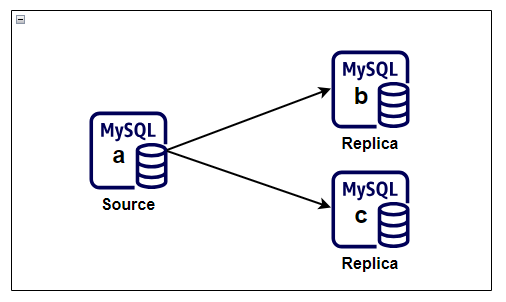
This series uses a simple topology with one source and two replicas. The same shape supports the initial binlog-based setup before moving to GTID-based auto-positioning later in the series.
Baseline Prerequisites
Before configuring replicas, verify the following across the topology:
- Binary logging is enabled on the source
- Every server has a unique
server-id - Every server has a unique
server_uuid - Replicas can reach the source over the network
- A dedicated replication user exists on the source
One of the easiest mistakes in cloned lab environments is duplicated UUID metadata. If multiple servers were copied from the same image, validate UUID uniqueness immediately.
Checks to run:
SELECT @@server_id;
SELECT @@server_uuid;
SHOW VARIABLES LIKE 'skip_networking';
If skip_networking is ON, the replica will not be able to connect to the source over TCP.
Source Configuration for Binlog Replication
On the source server, the MySQL configuration needs durable binary logging behavior and a unique identifier.
Example configuration:
[mysqld]
log-bin=mysql-bin
log-bin-index=mysql-bin.index
server-id=1
binlog-format=ROW
innodb_flush_log_at_trx_commit=1
sync-binlog=1
ROW format is the safer default for modern replication because it avoids a number of ambiguity issues found in statement-based logging.
Replica Configuration Basics
Each replica needs its own server ID and relay log settings.
Example configuration:
[mysqld]
server-id=2
relay-log=relay-mysql-b
relay-log-index=relay-mysql-b.index
skip-slave-start
For a second replica, keep the same structure but assign a different server-id and relay log name.
skip-slave-start is useful during initial provisioning because it prevents replication from starting before the configuration is complete.
Handling Duplicate Server UUIDs
If two servers report the same @@server_uuid, stop MySQL on the affected replica, remove or move the auto.cnf file, and start MySQL again so a fresh UUID is generated.
Example flow:
sudo systemctl stop mysqld
sudo mv /var/lib/mysql/auto.cnf /tmp/auto.cnf.backup
sudo systemctl start mysqld
Then verify:
SELECT @@server_uuid;
Creating a Dedicated Replication User
Create a dedicated account on the source instead of reusing an administrative login.
Example pattern:
CREATE USER 'replication_user'@'10.0.0.%' IDENTIFIED BY '<strong-password>';
GRANT REPLICATION SLAVE ON *.* TO 'replication_user'@'10.0.0.%';
FLUSH PRIVILEGES;
Use the narrowest host specification that fits your environment. Avoid % when you know the replica subnet or host list.
What Comes Next
At this stage, the source and replicas are prepared, but data has not yet been synchronized. In Part 2, I walk through the bootstrap flow for binlog-based replication: capturing a consistent snapshot, recording binary log coordinates, loading the snapshot on replicas, and starting replication cleanly.