Practical MySQL Server Administration - Part 5: MySQL Storage Engines Overview
Part 5 explains storage engines in this 7-part practical MySQL administration series.
People often talk about MySQL as if storage behavior stayed uniform. In practice, MySQL uses a pluggable storage-engine architecture, so table behavior depends heavily on the engine selected underneath it.
For administrators, that matters a lot. The engine affects durability, locking behavior, indexing support, file layout, and what kinds of operations remain possible.
What a Storage Engine Does
Storage engines handle SQL operations for different table types inside MySQL.
In modern MySQL:
InnoDBserves as the default storage engineMyISAMremains important historically and in certain legacy workloads- other engines such as
MEMORY,CSV,ARCHIVE,BLACKHOLE,FEDERATED, andNDBserve specialized use cases
Inspect Supported Engines
Use SHOW ENGINES to list the engines available on a server.
SHOW ENGINES;
Example terminal output:
mysql> show engines\G;
*************************** 1. row ***************************
Engine: InnoDB
Support: DEFAULT
Comment: Supports transactions, row-level locking, and foreign keys

*************************** 2. row ***************************
Engine: MyISAM
Support: YES
Comment: MyISAM storage engine

*************************** 3. row ***************************
Engine: MEMORY
Support: YES
Comment: Hash based, stored in memory, useful for temporary tables

*************************** 4. row ***************************
Engine: CSV
Support: YES
Comment: CSV storage engine

*************************** 5. row ***************************
Engine: ARCHIVE
Support: YES
Comment: Archive storage engine
The
Supportcolumn shows whether an engine serves as the default, remains available, or stays unavailable on that host.
Understand the Two Main Engine Categories
From an administrative perspective, the first major divide stays simple.
Transactional engines:
- support rollback
- preserve ACID semantics
- protect data consistency across multi-step operations
Non-transactional engines:
- commit changes immediately
- do not offer rollback semantics in the same way
- may require application-level recovery if a multi-step write sequence fails midway
For most general-purpose production workloads, choose InnoDB because it supports transactions, foreign keys, and crash recovery features administrators rely on.
Match Engines to Use Cases
This post maps common engines to typical usage patterns:
InnoDBfor transaction-heavy OLTP workloadsMyISAMfor older or read-oriented use casesMEMORYfor fast access to non-critical in-memory dataCSVfor simple import and export scenariosARCHIVEfor large amounts of infrequently accessed archival dataBLACKHOLEfor certain replication-oriented patternsNDBfor clustered, high-availability environmentsFEDERATEDfor distributed access models
Storage Engine Architecture
The following diagram gives a good conceptual view of how connectors, the MySQL server process, the SQL layers, storage engines, and the filesystem fit together.
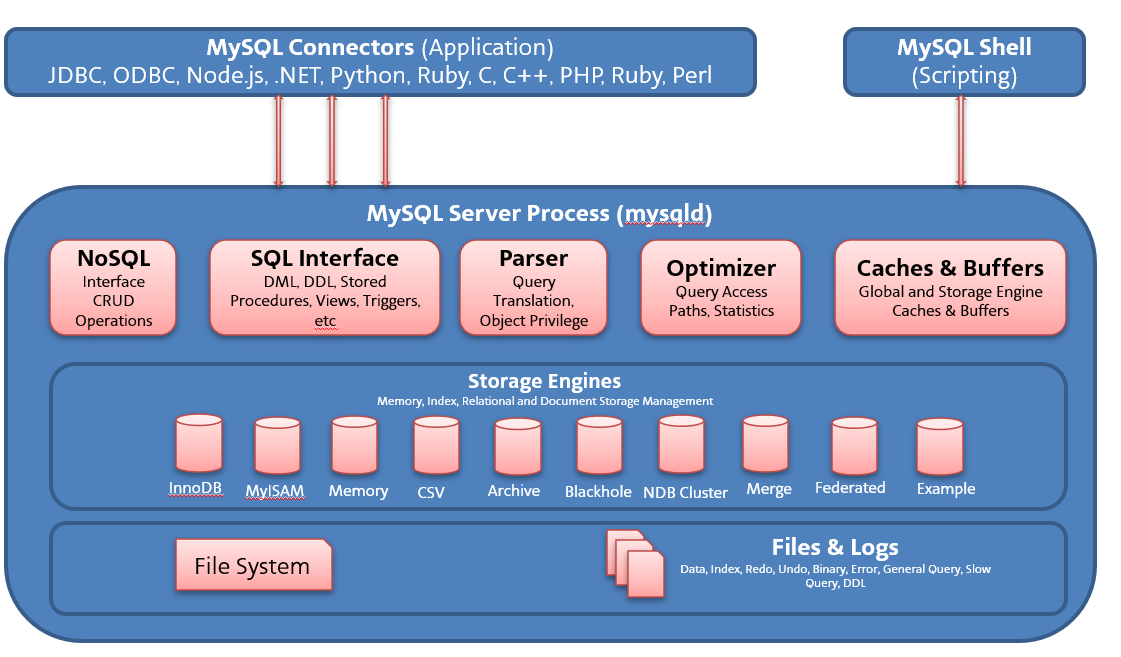
Figure 1. MySQL storage engine architecture.
Use this figure to explain why the same MySQL server can expose different persistence behavior depending on the engine selected for a table.
Why Administrators Should Care
Storage engine choice affects more than table creation syntax.
It also affects:
- durability expectations
- compatibility with indexes and keys
- file extensions on disk
- support for temporary or archival data patterns
- what you should expect when you convert a table from one engine to another
That last point matters quickly in real environments, so I cover engine conversion behavior in the next article.
Final Thoughts
Storage engines form one of the most distinctive parts of MySQL administration. Once you understand that the server stays pluggable at the storage layer, many seemingly odd behaviors start to make sense.
In Part 6, I walk through practical engine conversion examples, file layout changes, and plugin-based engine loading.